Project 14 XGO Acceleration
Ⅰ. Teaching Aims
Read the acceleration value of the on-board IMU (unit: mg or %, defined by the firmware).
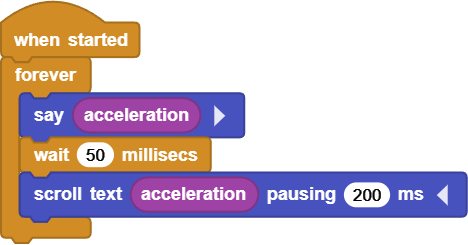
Use a dot matrix to “broadcast” the acceleration in real time.
When the acceleration exceeds the threshold, enable XGO to provide built-in action feedback.
Ⅱ. Pre-class Check
XGO + Foxbit + MicroBlocks IDE.
XGO battery power ≥ 60 %.
MicroBlocks status bar shows a green dot, XGO-lite extension is loaded and the development board model is Foxbit.
Ⅲ. Key Blocks Analysis
|
|
|---|---|
Functions |
Output single-axis or composite acceleration |
Tips |
The firmware unit may be %(1g≈100) or mg |
|
|
Functions |
Scroll the string to a 5×7 dot matrix |
Tips |
The smaller the |
|
|
Functions |
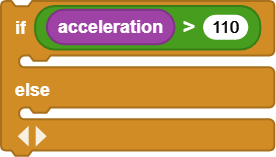
Execute according to the threshold branch |
Tips |
|
|
|
Functions |
Perform the built-in wave action |
Tips |
When it cannot be found, |
|
|
Functions |
The body slides up and down, |
Tips |
Z, positive for up, negative for down |




Ⅳ. Test 1: LED Scroll + Bubble Broadcast
Online code: Click here
Ⅴ. Test 2: Action of Threshold
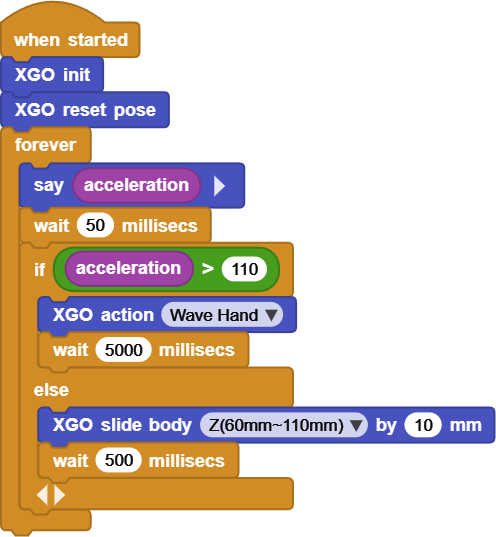
Online code: Click here
Ⅵ. Quiz
If the
pausing 100 msof Test 1 is changed to20 ms, what will be the scrolling effect?What will occur in the action trigger frequency if the threshold is changed from 100 to 140 in Test 2? Why?
How to calculate the composite acceleration by
sqrt(accX² + accY² + accZ²)so that the threshold is independent of direction?
Ⅶ. FAQ
Questions |
Possible causes |
Solutions |
|---|---|---|
The value of acceleration remains almost unchanged |
No |
Restart or first execute |
No scrolling content on LED |
In |
Check the block parameters |
Only do half of the action |
|
Set |
The entire program is lagging |
Multiple long |
Replace the blocking |