Project 6 XGO Draws A Square
Ⅰ. Teaching Aims
Consolidate the segmentation thinking of “walk - stop - turn - stop” and avoid taking arcs.
Use
repeatto simplify the repeated path.Adjust the step size and waiting time through distance measurement, making the displacement more accurate.
Use the
foreverinfinite loop to perform square movements.
Ⅱ. Pre-class Check
XGO + Foxbit + MicroBlocks IDE.
Prepare an 80 cm × 80 cm blank floor and stick positioning points at the four corners with tape.
XGO battery power ≥ 60 %.
MicroBlocks status bar shows a green dot, XGO-lite extension is loaded and the development board model is Foxbit.
If precise distance measurement is required, prepare a tape measure or stick a scale paper tape on the ground.
Ⅲ. Key Blocks Analysis
|
|
|---|---|
Functions |
|
Common misuses |
The walking section still gives |
|
|
Functions |
Maintain the previous instruction for ms milliseconds |
Common misuses |
Write milliseconds as seconds → Wait too short |
|
|
Functions |
|
Common misuses |
Forgot |
|
|
Functions |
Loop the code block k times |
Common misuses |
Forgot to write |
|
|
Functions |
Forever loop |





Ⅳ. Calculation of Step Size and Distance
Hard ground, 6.0V experience value:
Step size |
1000 ms Forward distance |
|---|---|
40 |
≈ 12 cm |
60 |
≈ 15 cm |
80 |
≈ 19 cm |
Calculation:
Waiting time(ms) ≈ Target distance(cm) ÷ (distance each 1000 ms) × 1000
Example: target distance is 30 cm, so we use a step size of 60 → 30 ÷ 15 × 1000 ≈ 2000 ms
Ⅴ. Test 1: 30cm Straight Line
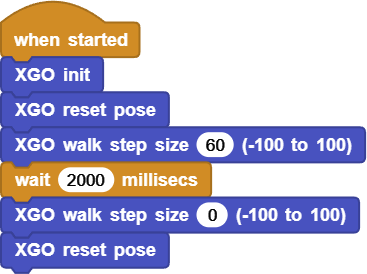
Click ▶Run, and then measure the displacement with a ruler; If the deviation is greater than 3 cm, fine-tune and wait for ±100 ms.
Online code: Click here
Ⅵ. Test 2: Square Route
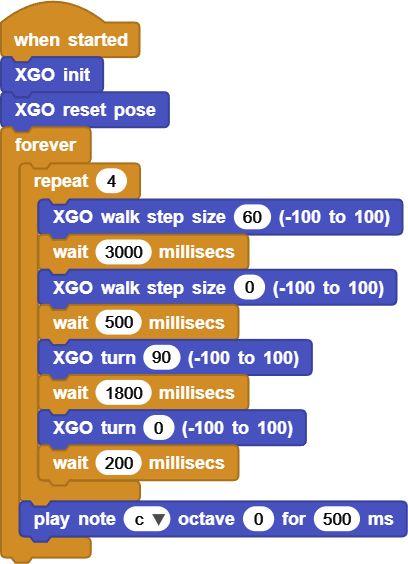
Requirement: Walk 30 cm → turn right at 90° → repeat 4 times, and finally return to the starting point.
Recommended:
Go straight:
walk 60+wait 3000Stop:
walk 0+wait 500Turn:
turn 90+wait 1800(≈ 90°)Zero out:
turn 0+wait 200
Loop script sample:
Online code: Click here
Debugging tips:
The turning angle is • too small →
wait+50~100 ms • too large →wait−50 msThe route is trapezoidal → Reduce the step size to 50, and ensure the ground is flat.
Ⅶ. Quiz
Why is it necessary to
walk 0before starting theturnafter the straight section ends?If we modify it to turn left and draw a counter-clockwise square, which two parts of the script should be changed?
How to package “step size, distance, angle” with custom blocks to improve reusability?
Ⅷ. FAQ
Questions |
Possible causes |
Solutions |
|---|---|---|
Walk in an arc line |
Still set |
Section: Reset to zero after walking and then turn |
The turning angle is too small / too large |
|
Fine-tune in steps of 50 ms |
It’s still rotating after turning |
Forgot |
Reset to zero immediately after the turn |
Cannot return to the starting point |
The accumulation of errors in walking distance |
Slow the speed down, increase friction, or recalibrate |