Project 2 XGO’s First Step
Ⅰ. Teaching Aims
Master the positive/negative values of
XGO walk step sizeand their relationship with the direction of travel and speed.Use
wait … msto control the duration of one gait.Write the minimum walking script of “forward - pause - backward” and add a beeping prompt sound.
Ⅱ. Pre-class Check
XGO + Foxbit + MicroBlocks IDE.
XGO battery power ≥ 60 %.
The ground/desktop is flat, and the straight path is no less than 60 cm.
MicroBlocks status bar shows a green dot, and the development board model is Foxbit.
Run
XGO initandXGO reset poseto confirm that everything is normal.
Ⅲ. Key Blocks Analysis
|
|
|---|---|
Functions |
Keep walking and set the step size |
Value range |
−100 ~ 100; Positive for forwards, negative for backwards |
Fallible points |
0 → not move |
|
|
Functions |
Pause the script to maintain the current gait |
Value range |
ms; 1000 ms = 1 s |
Fallible points |
Treat milliseconds as seconds |
|
|
Functions |
The buzzer plays notes |
Value range |
Note C4–B6;ms > 0 |
Fallible points |
Forget the duration → Long beeping |



Ⅳ. Test 1: Minimum Walking Script
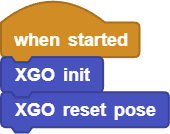
Retain the first three lines of initialization:
Add 4 instructions in sequence:
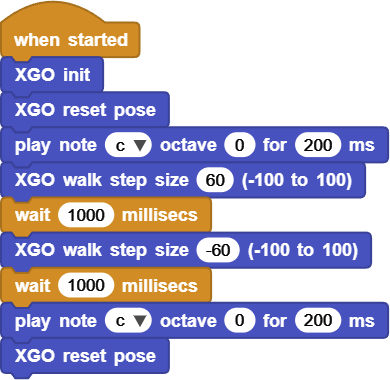
Click ▶Run and the XGO will perform “Forward - beep - Backward - beep”.
Online code: Click here
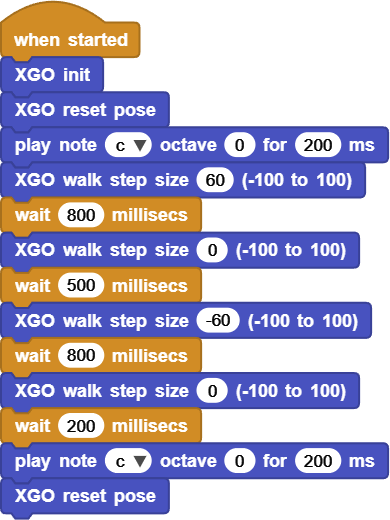
Ⅴ. Test 2: Start/Stop Beeping+ Walking
Requirement:
Play
C5once at the beginning and once at the end of the action.The walking sequence is “forward → stop → backward → stop”.
Reference script:
Online code: Click here
Ⅵ. Quiz
Why does
walk step sizeremain in effect until the next walk instruction appears?What will happen if we change
waitto 100 ms? Try to find the minimum available waiting value.If you want XGO to make a “woof” sound (buzzer) while moving, where should the
play tonebe inserted?
Ⅶ. FAQ
Questions |
Possible causes |
Solutions |
|---|---|---|
Only move forward, |
Forgot to write negative step size |
Check the script sequence |
Shake/slip while walking |
Excessive step size or slippery ground |
Reduce the step size; |
No sound in the buzzer |
The channel is occupied |
Restart the IDE; |
Be imbalance while walking |
Voltage drop |
Pause the test and charge it |