Project 15 XGO Dance Show
Ⅰ. Teaching Aims
Use both the on-board microphone and capacitive touch (Logo) to achieve dual-channel sensing input.
Mapping relationship:
• Touch →
Crawl(crawl forward) • Sound →Dance(dance)Integrate LED dot matrix “emoji” and buzzer waiting to make the feedback more intuitive.
Practice multiple
if / elseand different waiting times, and experience the switching of “action fragments”.
Ⅱ. Pre-class Check
XGO + Foxbit + MicroBlocks IDE.
XGO battery power ≥ 60 %. The desktop is spacious, making it convenient to clap hands and touch during the test.
MicroBlocks status bar shows a green dot, XGO-lite extension is loaded and the development board model is Foxbit.
Ⅲ. Key Blocks Analysis
|
|
|---|---|
Functions |
Detect Logo touch (Boolean) |
Tips |
When it is true, directly enter |
|
|
Functions |
Return ambient sound pressure (0-100 or 0-255) |
Tips |
It is recommended to first measure values by |
|
|
Functions |
LED dot matrix preset emojis |
Tips |
happy😊, sad😞, heart❤️ … |
|
|
Functions |
Scroll text |
Tips |
The smaller the |
|
|
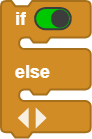
Functions |
Logic branch |
Tips |
It can be nested multiple ones |
|
|
Functions |
Pause before the action and text are completed |
Tips |
It is suggested to change it to a variable |
|
|
Functions |
Crawl forward |
Tips |
If you cannot find it in the list, try Crawl1 |
|
|
Functions |
Dance in place |
Tips |
If the firmware is different, it might be called Dance1 |
|
|
Functions |
The body slides up and down |
Tips |
Positive for up and negative for down, |
|
|
Functions |
Buzzer sounds |
Tips |
440Hz 500ms is standard A |







Ⅳ. Test (Complete Code)
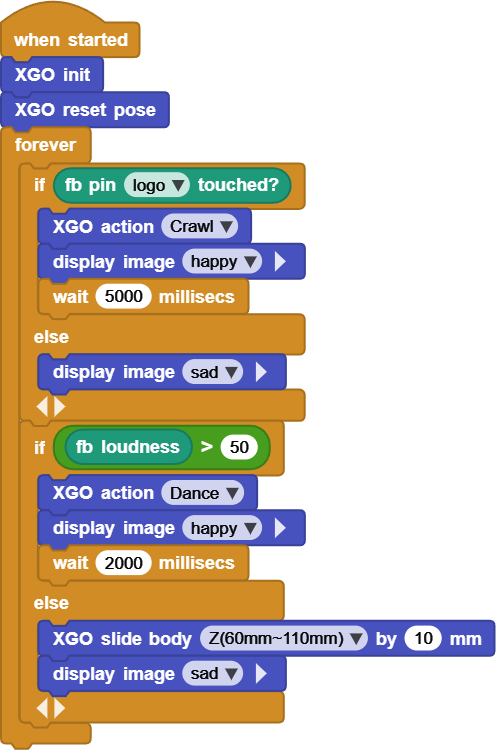
Online code: Click here
Ⅴ. Variant Practice
Change
wait 5000 msandwait 2000 msto variablestouchDelay/soundDelay, and define them at once at the top for convenient parameter adjustment in the future.Change the sound threshold to 60 and print the current sound pressure
print fb loudnessin theelsebranch, so as to find a threshold that is more suitable for your classroom.Replace the “sad emoji” with the
scroll text "COME ON", and guide the interaction among classmates.No applause? Let’s change “slide body up” to “slide body down” (
slide body Z by -10 mm) and use the 😴 emoji to inject a note of humor.
Ⅵ. FAQ
Questions |
Possible causes |
Solutions |
|---|---|---|
The touch is not sensitive |
Dry finger / Poor grounding |
Press the Logo for 2 s; |
The sound threshold is difficult to reach |
Noisy environment |
Raise the threshold to 65-70; |
|
Firmware version differences |
Look for synonymous blocks in the action panel, |
LED emojis flash |
The loop is too fast, resulting in repeated refreshing |
Before entering the same state, |