Project 16 Touch Alarm
1.Introduction
In the electronic world, many elements can be used as switches. Here is another one, touch sensor. In this lesson, we will make a touch alarm with this sensor and an active buzzer. When you touch the sensor sensing area, the alarm will go off.
2.Components Needed
EASY plug Control Board V2.0 *1
EASY plug Cable *2
USB Cable *1
EASY plug Active Buzzer Module *1
EASY plug Capacitive Touch Sensor *1
First, let’s first take a look at this EASY plug Capacitive Touch Sensor.
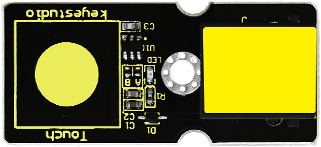
Are you tired of clicking mechanic button? Well, this little sensor can “feel” people and metal touch and feedback a high/low voltage level. Even isolated by some cloth and paper, it can still feel the touch. Its sensitivity decrease as isolation layer gets thicker. Below are its specifications:
Supply Voltage: 3.3V to 5V
Interface: Digital
Size: 45*20mm
Weight: 5g
3.Connection Diagram
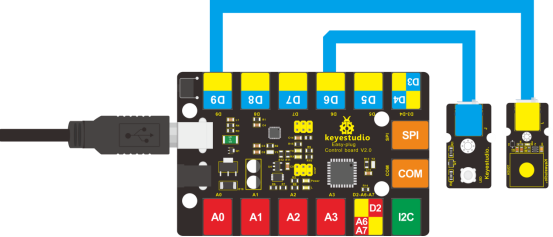
Now, connect the buzzer module to the D6 port of the controller board, and capacitive touch sensor to D9 port using the EASY plug cables.
4.Test Code
Connect the board to your PC using the USB cable; copy below code into Arduino IDE, and click upload to upload it to your board.
int buzzPin = 6;    //Connect Buzzer to Digital Pin6
int inputPin = 9;     // Connect Touch sensor to Digital Pin 9

void setup()
{
  pinMode(buzzPin, OUTPUT);      // declare buzzer as output
  pinMode(inputPin, INPUT);     // declare Touch sensor as input
}

void loop()
{
  int val = digitalRead(inputPin);  // read input value
  if (val == HIGH)
  {            // check if the input is HIGH
    digitalWrite(buzzPin, HIGH);  // turn buzzer ON
  }
  else
  {
   digitalWrite(buzzPin, LOW); // turn buzzer OFF
  }
}
5.Test Results
Use your finger to touch the sensor sensing area, the buzzer will ring; otherwise the buzzer remains silent.