Project 4 Flowing Light
1.Introduction
LED can do many things. I believe you have seen billboards with lights changing to various patterns. Now, you can make one by yourself! And this lesson is called Flowing light. We will need 3 more EASY plug cables and 3 more LEDs than the previous lesson.
2.Components Needed
EASY plug Control board V2.0 *1
EASY plug cable *3
USB cable *1
EASY plug Digital White LED Module *3
3.Connection Diagram
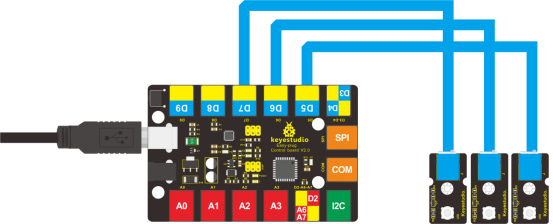
Now, connect the LED modules one by one to D5, D6 and D7 ports of the controller board using the EASY plug cables.
4.Test Code
Connect the board to your PC using the USB cable; copy below code into Arduino IDE, and click upload to upload it to your board.
int BASE = 5 ;  // the I/O pin for the first LED
int NUM = 3;   //  number of LEDs

void setup()
{
   for (int i = BASE; i < BASE + NUM; i ++)
   {
     pinMode(i, OUTPUT);   // set I/O pins as output
   }
}

void loop()
{
   for (int i = BASE; i < BASE + NUM; i ++)
   {
     digitalWrite(i, HIGH);    //set I/O pins as “high”, turn on LEDs one by one
     delay(300);        // wait 0.3S
   }
    for (int i = BASE; i < BASE + NUM; i ++)
   {
     digitalWrite(i, LOW);    // set I/O pins as “low”, turn off LEDs one by one
     delay(300);        // wait 0.3S
   }
}
5.Test Results
3 LEDs turn on one by one, and then turn off one by one, just like flowing light.