Project 6 Who’s Singing
1.Introduction
In the previous lesson, we have learned how to make a sound. In this lesson, we will use another type of buzzer to code the melody of a song. It’s called a passive buzzer. Using the codes we gave you, this lesson is also quite simple.
2.Components Needed
EASY plug Control Board V2.0 *1
EASY plug Cable *1
USB Cable *1
EASY plug Passive Buzzer Module *1
Let’s first learn a little bit about this EASY plug passive buzzer module.
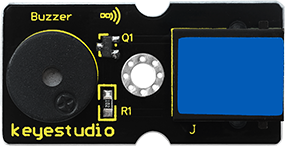
Different from active buzzer, passive buzzer is not set with a vibration source, so DC signal cannot make it buzz. A 2K~5K square wave is used to drive it. Different frequencies produce different sounds. So we can use Arduino to code the melody of a song. Below are its specifications:
Working voltage: 3.3-5v
Interface type: digital
Size: 39*20mm
Weight: 6g
3.Connection Diagram
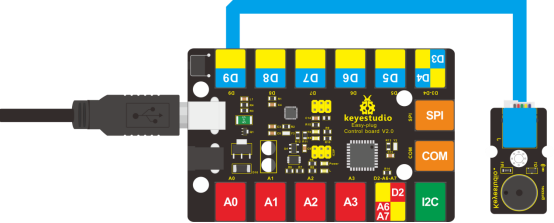
Now, connect the module to the D9 port of the controller board using the EASY plug cable.
4.Test Code
Connect the board to your PC using the USB cable; copy below code into Arduino IDE, and click upload to upload it to your board.
#define D0 -1
#define D1 262
#define D2 293
#define D3 329
#define D4 349
#define D5 392
#define D6 440
#define D7 494

#define M1 523
#define M2 586
#define M3 658
#define M4 697
#define M5 783
#define M6 879
#define M7 987

#define H1 1045
#define H2 1171
#define H3 1316
#define H4 1393
#define H5 1563
#define H6 1755
#define H7 1971
// List all D tune frequency
#define WHOLE 1
#define HALF 0.5
#define QUARTER 0.25
#define EIGHTH 0.25
#define SIXTEENTH 0.625

// list all tempos
int tune[]=        // List each frequency according to numbered musical notation
{
  M3,M3,M4,M5,
  M5,M4,M3,M2,
  M1,M1,M2,M3,
  M3,M2,M2,
  M3,M3,M4,M5,
  M5,M4,M3,M2,
  M1,M1,M2,M3,
  M2,M1,M1,
  M2,M2,M3,M1,
  M2,M3,M4,M3,M1,
  M2,M3,M4,M3,M2,
  M1,M2,D5,D0,
  M3,M3,M4,M5,
  M5,M4,M3,M4,M2,
  M1,M1,M2,M3,
  M2,M1,M1
};

float durt[]=       // list all tempo according to numbered musical notation
{
  1,1,1,1,
  1,1,1,1,
  1,1,1,1,
  1+0.5,0.5,1+1,
  1,1,1,1,
  1,1,1,1,
  1,1,1,1,
  1+0.5,0.5,1+1,
  1,1,1,1,
  1,0.5,0.5,1,1,
  1,0.5,0.5,1,1,
  1,1,1,1,
  1,1,1,1,
  1,1,1,0.5,0.5,
  1,1,1,1,
  1+0.5,0.5,1+1,
};
int length;
int tonepin=9;   // set module signal pin to D9

void setup()
{
  pinMode(tonepin,OUTPUT);
  length=sizeof(tune)/sizeof(tune[0]);   // calculate length
}

void loop()
{
  for(int x=0;x<length;x++)
  {
    tone(tonepin,tune[x]);
    delay(500*durt[x]);   // this is use to adjust tempo delay, you can change the number to your liking.
    noTone(tonepin);
  }
  delay(2000);
}
5.Test Results
The buzzer will play Ode to Joy, and then pause for 2S.