Project 17 Knock Sensing
1.Introduction
We know sensor can sense all kinds of changes. In this lesson, we will learn how to sense a knock. This sensor has many applications. It can also functions like a switch.
2.Components Needed
EASY plug Control Board V2.0 *1
EASY plug Cable *2
USB Cable *1
EASY plug Digital White LED Module *1
EASY plug Knock Sensor *1
Let’s first take a look at this EASY plug Knock Sensor.
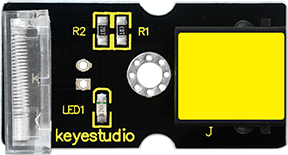
This module is a knock sensor. When you knock it, it can send a momentary signal. We can combine it with Arduino to make some interesting experiments, e.g. electronic drum. Below are its specifications:
Working voltage: 5V
Size: 38*20mm
Weight: 5g
3.Connection Diagram
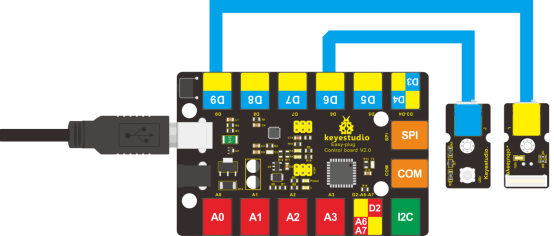
Now, connect the LED module to the D6 port of the controller board, and knock sensor to D9 port using the EASY plug cables.
4.Test Code
Connect the board to your PC using the USB cable; copy below code into Arduino IDE, and click upload to upload it to your board.
int Led=6;//define LED interface
int knock=9;//define knock sensor interface;
int val;//define digital variable val

void setup()
{
    pinMode(Led,OUTPUT);//define LED pin to be output
    pinMode(knock,INPUT);//define knock sensor pin to be input
}

void loop()
{
    val=digitalRead(knock);// read the value of interface9 and assign it to val
    if(val==HIGH)// when the knock sensor detect a signal, LED will turn on
    {
    	digitalWrite(Led,LOW);
    }
    else
    {
        digitalWrite(Led,HIGH);
        delay(1000);
    }
}
5.Test Results
Every time you knock the sensor, the LED turns on. Otherwise, it remains off.