5.2 光制御システム
5.2.1 フォトレジスタセンサー
Arduino IDEで5.2.1Photocell-sensorコードを開きます。
#define PhotocecllPin 34  //Define the photoresistor pin

void setup() {
  //Initialize the serial port
  Serial.begin(9600);
  //Set the pin to input mode
  pinMode(PhotocecllPin,INPUT);
}

void loop() {
  //Read the value of photoresistor
  int ReadValue = analogRead(PhotocecllPin);
  //Print the value. NOTE: ESP32 board is 12-bit ADC, whose detection value range is within 0~4095.
  Serial.print("Photocecll value: ");
  Serial.println(ReadValue);
  delay(500);
}
ESP32 Dev ModuleボードとCOMポートを選択し、コードをアップロードします。

テスト結果:
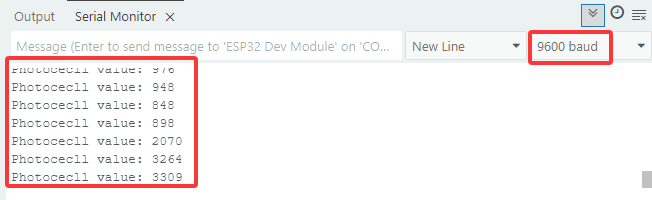
シリアルモニターを開きます。
フォトレジスタが検出する光が明るいほど、値は大きくなります。
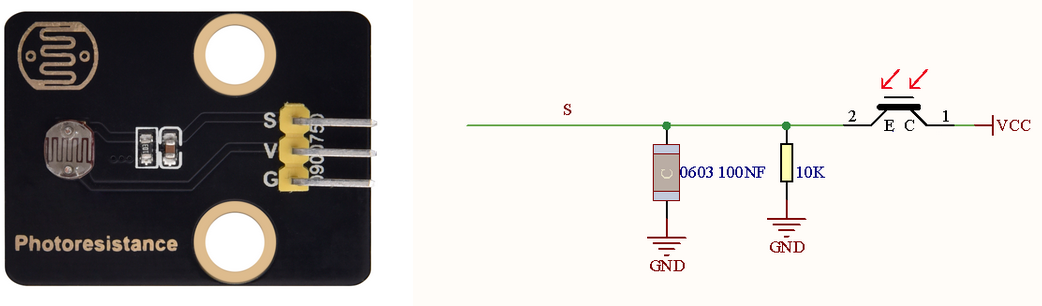
フォトレジスタモジュールは、光信号を電気信号(電圧、電流、抵抗)に変換します。光がフォトレジスタに当たると、光が強いほど抵抗が小さくなるため、より多くのVCC電圧がフォトレジスタを通過します。
5.2.2 光制御システム
Arduino IDEで5.2.2Light-Control-Systemコードを開きます。
#define PhotocecllPin 34  //Define the photoresistor pin
#define LED           27  //Define LED pin

void setup() {
  //Initialize serial port
  Serial.begin(9600);
  //Set the photoresistor pin to input mode
  pinMode(PhotocecllPin,INPUT);
  //Set the LED pin to output mode
  pinMode(LED,OUTPUT);
}

void loop() {
  //Read the value of the photoresistor
  int ReadValue = analogRead(PhotocecllPin);
  //Print the value. NOTE: ESP32 board is 12-bit ADC, whose detection value range is within 0~4095.
  Serial.print("Photocecll value: ");
  Serial.println(ReadValue);
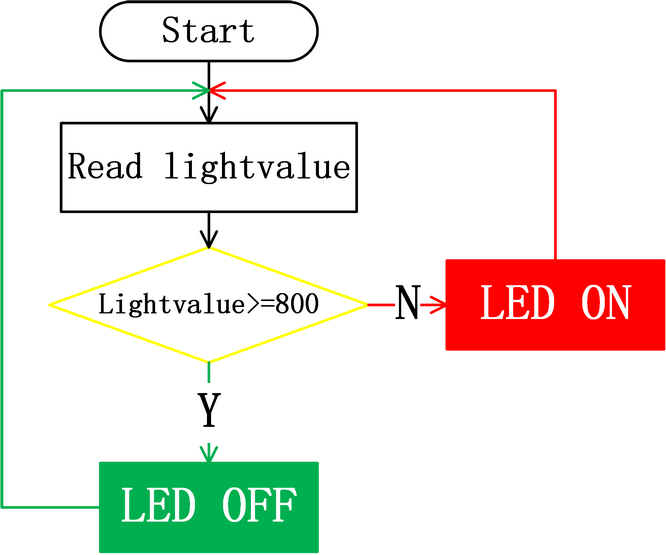
  //Determine:
  //The value of the photoresistor >= 800, LED turns off
  //The value of the photoresistor =< 800, LED turns on
  if(ReadValue >= 800) {
    digitalWrite(LED,LOW);
    Serial.println("LED OFF");
  }
  else{
    digitalWrite(LED,HIGH);
    Serial.println("LED ON");
  }
  delay(100);
}
ESP32 Dev ModuleボードとCOMポートを選択し、コードをアップロードします。
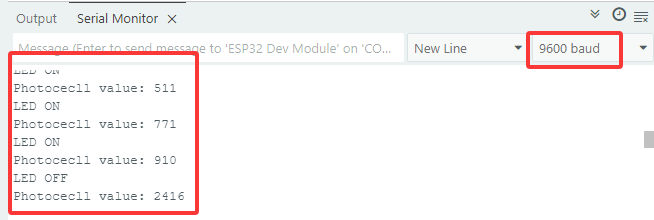
テスト結果:
フォトレジスタの値が800より大きい場合(日中)、LEDは消灯します。ただし、値が800未満の場合、LEDは自動的に点灯します。