Project 12 Bluetooth Remote Control of Smar
1.Introduction
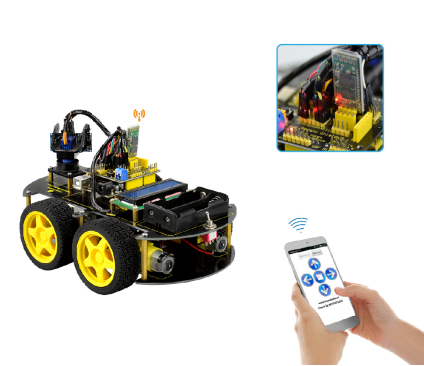
This project, regarding Arduino as main control, uses Bluetooth module to receive signal from mobile phone, and then send the signal to Arduino. Arduino will analyze the signal and then control the driver motor to control the motion of the car. In addition, you can observe the state and speed of the car, the angle of motor, and the distance between car and obstacle through keyestudio 1602 I2C Module.
2.Principle
Connecting Aduino to Bluetooth module, this module communicates with APP on the mobile phone
APP sending “U”“D”“L”“R”“S” to Bluetooth module
Bluetooth module will send the received massage to Arduino, and Arduino controls the car correspondingly.
When Arduino receiving “U”, the car goes forward; when receiving “D”, it goes backward; when receiving “R”, it turns right; when receiving “S”, it stops moving.
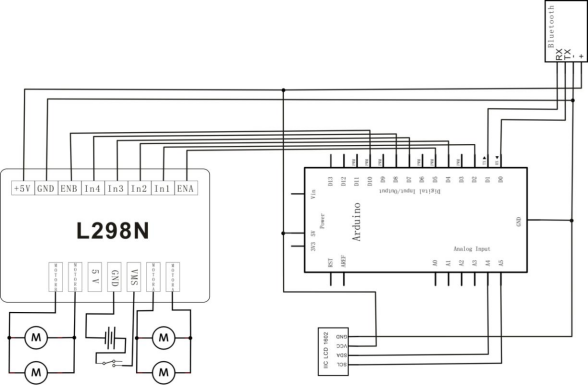
3.Schematic Diagram
Pay more attention that here you must first upload the code to the board and then plug in the Bluetooth module, otherwise the program fails to compile.
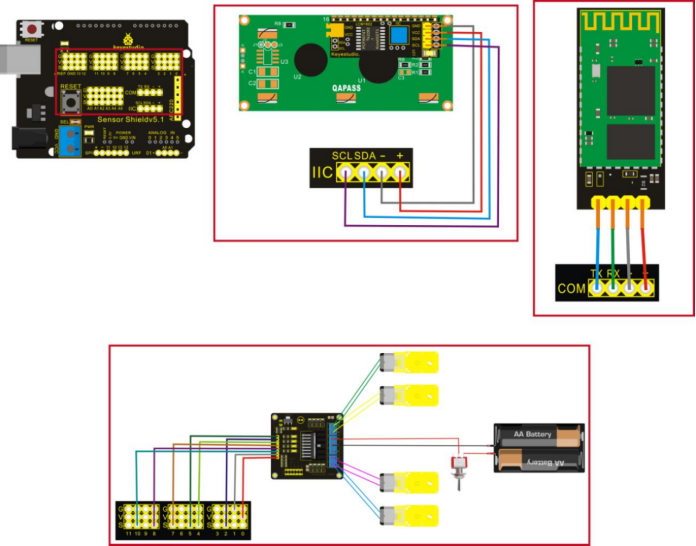
4.Connection Diagram
5.Sample Code
#include <LiquidCrystal_I2C.h>   //including the libraries of I2C-LCD1602 liquid crystal
#include <Wire.h>                //including the libraries of I2C
unsigned char Bluetooth_val;       //defining variable val
LiquidCrystal_I2C lcd(0x27,16,2);  //defining liquid crystal
#define Lpwm_pin  5     //adjusting speed
#define Rpwm_pin  10    //adjusting speed  //
int pinLB=2;     // defining pin2 left rear
int pinLF=4;     // defining pin4 left front
int pinRB=7;    // defining pin7 right rear
int pinRF=8;    // defining pin8 right front
unsigned char Lpwm_val = 255;
unsigned char Rpwm_val = 255;
int Car_state=0;

void M_Control_IO_config(void)
{
  pinMode(pinLB,OUTPUT); // pin 2
  pinMode(pinLF,OUTPUT); // pin 4
  pinMode(pinRB,OUTPUT); // pin 7
  pinMode(pinRF,OUTPUT); // pin 8
  pinMode(Lpwm_pin,OUTPUT); // pin 11 (PWM)
  pinMode(Rpwm_pin,OUTPUT); // pin 10 (PWM)
}

void Set_Speed(unsigned char Left,unsigned char Right)
{
  analogWrite(Lpwm_pin,Left);
  analogWrite(Rpwm_pin,Right);
}

void advance()     //  going forward
{
     digitalWrite(pinRB,LOW);  // making motor move towards right rear
     digitalWrite(pinRF,HIGH);
     digitalWrite(pinLB,LOW);  // making motor move towards left rear
     digitalWrite(pinLF,HIGH);
     Car_state = 1;
     show_state();
}

void turnR()        //turning right(dual wheel)
{
     digitalWrite(pinRB,LOW);  //making motor move towards right rear
     digitalWrite(pinRF,HIGH);
     digitalWrite(pinLB,HIGH);
     digitalWrite(pinLF,LOW);  //making motor move towards left front
     Car_state = 4;
     show_state();
}

void turnL()        //turning left(dual wheel)
{
     digitalWrite(pinRB,HIGH);
     digitalWrite(pinRF,LOW );   //making motor move towards right front
     digitalWrite(pinLB,LOW);   //making motor move towards left rear
     digitalWrite(pinLF,HIGH);
     Car_state = 3;
     show_state();
}

void stopp()         //stop
{
     digitalWrite(pinRB,HIGH);
     digitalWrite(pinRF,HIGH);
     digitalWrite(pinLB,HIGH);
     digitalWrite(pinLF,HIGH);
     Car_state = 5;
     show_state();
}

void back()          //back up
{
     digitalWrite(pinRB,HIGH);  //making motor move towards right rear
     digitalWrite(pinRF,LOW);
     digitalWrite(pinLB,HIGH);  //making motor move towards left rear
     digitalWrite(pinLF,LOW);
     Car_state = 2;
     show_state() ;
}

void show_state(void)
{
   lcd.setCursor(0, 1);
   switch(Car_state)
   {
     case 1:lcd.print(" Go  ");
     break;
     case 2:lcd.print("Back ");
     break;
     case 3:lcd.print("Left ");
     break;
     case 4:lcd.print("Right");
     break;
     case 5:lcd.print("stop ");
     break;
     default:
     break;
   }
}

void LCD1602_init(void)            //including initialized function of liquid crystal
{
   lcd.init();  //invoking initialized function of LCD in LiquidCrystal_I2C.h
   delay(10);   //delaying for 10 millisecond
   lcd.backlight(); //open backlight of LCD1602
   lcd.clear();     //clear screen
}

void setup()
{
   LCD1602_init();
   M_Control_IO_config();
   Set_Speed(Lpwm_val,Rpwm_val);
   Serial.begin(9600);   //initialized serial port , using Bluetooth as serial port, setting baud at 9600
   lcd.setCursor(0, 0);  //setting cursor in the first row and column
   lcd.print("   Wait  Sigal");
   stopp();
}

void loop()
{
   lcd.setCursor(0, 0);  //setting cursor in the first row and column
   lcd.print("BluetoothControl");
   if(Serial.available()) //to judge whether the serial port receives the data.
   {
      Bluetooth_val=Serial.read();  //reading (Bluetooth) data of serial port,giving the value of val;
      switch(Bluetooth_val)
      {
           case 'U':advance(); //UP
           break;
           case 'D': back();   //back
           break;
           case 'L':turnL();   //Left
           break;
           case 'R':turnR();  //Right
           break;
           case 'S':stopp();    //stop
           break;
      }
   }
}