Project 13 5 in 1 Muilti-functional Car (Line Tracking, Obstacle Avoidance, Bluetooth and IR Remote Control, Distance Detecting)
1.Introduction
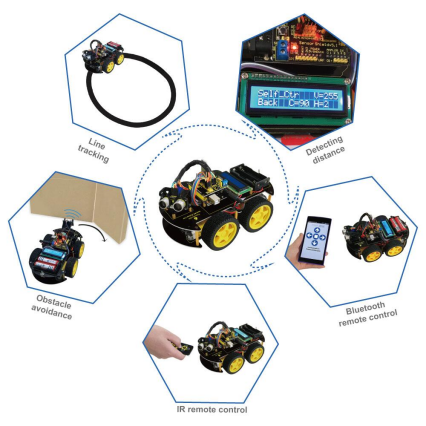
In this project, we will put five functions (namely line tracking, obstacle avoidance, Bluetooth and IR remote control, distance detection) together into one to realize the working mode of the car. Press the button “5” of IR remote control to start line tracking; button “6” to start ultrasonic obstacle avoidance and distance detecting; button “7” to start IR remote control, button “8”to start Bluetooth remote control, and press reset button to enter initialized mode.
2.Schematic Diagram
3.Connection Diagram
4.Sample Code
#include <LiquidCrystal_I2C.h>   //including libraries of I2C-LCD1602 liquid crystal
#include <Wire.h>              //including libraries of I2C
#include <IRremote.h>          //including libraries of remote control
#define RECV_PIN  12        //pin 12 of IR remoter control receiver
IRrecv irrecv(RECV_PIN);      //defining pin 12 of IR remoter control
decode_results results;         //cache of decode of IR remoter control
#define IR_Go       0x00ff629d //going forward
#define IR_Back     0x00ffa857  //going backward
#define IR_Left     0x00ff22dd  //turning left
#define IR_Right    0x00ffc23d  //turning right
#define IR_Stop     0x00ff02fd  //stop
#define IR_Servo_L  0x00ff6897  //motor turning left
#define IR_Servo_R  0x00ff9867  //motor turning right
#define IR_Speed_UP     0x00ffb04f //increasing speed
#define IR_Speed_DOWN   0x00ff30cf //decreasing speed
#define IR_XunJi_Mode   0x00ff18e7
#define IR_Self_Control  0x00ff7a85  //ultrasonic distance detecting
#define IR_IR_Control  0x00ff10ef
#define IR_Bluetooth_Control  0x00ff38c7
#define IR_ESC      0x00ff52ad  //quitting from remote control
//////////////////////////////////////////////////
#define SensorLeft    6   //sensor left pin of line tracking module
#define SensorMiddle  9   //sensor middle pin of line tracking module
#define SensorRight   11  //sensor right pin of line tracking module
unsigned char SL;        //state of left sensor of line tracking module
unsigned char SM;        //state of middle sensor of line tracking module
unsigned char SR;        //state of right sensor of line tracking module
int inputPin=A0;  // ultrasonic module   ECHO to A0
int outputPin=A1;  // ultrasonic module  TRIG to A1
unsigned char Bluetooth_val;       // ultrasonic module  TRIG to A1
LiquidCrystal_I2C lcd(0x27,16,2);   //defining liquid crystal
#define Lpwm_pin  5     //pin of controlling speed---- ENA of motor driver board
#define Rpwm_pin  10    //pin of controlling speed---- ENB of motor driver board
int pinLB=2;             //pin of controlling turning---- IN1 of motor driver board
int pinLF=4;             //pin of controlling turning---- IN2 of motor driver board
int pinRB=7;            //pin of controlling turning---- IN3 of motor driver board
int pinRF=8;            //pin of controlling turning---- IN4 of motor driver board
unsigned char Lpwm_val = 250; //initialized left wheel speed at 250
unsigned char Rpwm_val = 250; //initialized right wheel speed at 250
int Car_state=0;             //the working state of car
int servopin=3;              //defining digital port pin 3, connecting to signal line of servo motor
int myangle;                //defining variable of angle
int pulsewidth;              //defining variable of pulse width
unsigned char DuoJiao=60;    //initialized angle of motor at 60°

void Sensor_IO_Config()     //IO initialized function of three line tracking , all setting at input
{
  pinMode(SensorLeft,INPUT);
  pinMode(SensorMiddle,INPUT);
  pinMode(SensorRight,INPUT);
}

void Sensor_Scan(void) //function of reading-in signal of line tracking module
{
  SL = digitalRead(SensorLeft);
  SM = digitalRead(SensorMiddle);
  SR = digitalRead(SensorRight);
}

void servopulse(int servopin,int myangle) //defining a function of pulse
{
  pulsewidth=(myangle*11)+500; //converting angle into pulse width value at 500-2480
  digitalWrite(servopin,HIGH); //increasing the level of motor interface to upmost
  delayMicroseconds(pulsewidth); //delaying microsecond of pulse width value
  digitalWrite(servopin,LOW); //decreasing the level of motor interface to the least
  delay(20-pulsewidth/1000);
}

void Set_servopulse(int set_val)
{
  for(int i=0;i<=10;i++)  //giving motor enough time to turn to assigning point
   servopulse(servopin,set_val); //invokimg pulse function
}

void M_Control_IO_config(void)
{
  pinMode(pinLB,OUTPUT); // /pin 2
  pinMode(pinLF,OUTPUT); // pin 4
  pinMode(pinRB,OUTPUT); // pin 7
  pinMode(pinRF,OUTPUT);  // pin 8
  pinMode(Lpwm_pin,OUTPUT);  // pin 11 (PWM)
  pinMode(Rpwm_pin,OUTPUT);  // pin10(PWM)
}

void Set_Speed(unsigned char Left,unsigned char Right) //function of setting speed
{
  analogWrite(Lpwm_pin,Left);
  analogWrite(Rpwm_pin,Right);
}

void advance()    //  going forward
{
  digitalWrite(pinRB,LOW);  // making motor move towards right rear
  digitalWrite(pinRF,HIGH);
  digitalWrite(pinLB,LOW);  // making motor move towards left rear
  digitalWrite(pinLF,HIGH);
  Car_state = 1;
  show_state();
}

void turnR()        //turning right(dual wheel)
{
   digitalWrite(pinRB,LOW);  //making motor move towards right rear
   digitalWrite(pinRF,HIGH);
   digitalWrite(pinLB,HIGH);
   digitalWrite(pinLF,LOW);  //making motor move towards left front
   Car_state = 4;
   show_state();
}

void turnL()         //turning left(dual wheel)
{
   digitalWrite(pinRB,HIGH);
   digitalWrite(pinRF,LOW );   //making motor move towards right front
   digitalWrite(pinLB,LOW);   //making motor move towards left rear
   digitalWrite(pinLF,HIGH);
   Car_state = 3;
   show_state();
}

void stopp()        //stop
{
   digitalWrite(pinRB,HIGH);
   digitalWrite(pinRF,HIGH);
   digitalWrite(pinLB,HIGH);
   digitalWrite(pinLF,HIGH);
   Car_state = 5;
   show_state();
}

void back()         //back up
{
   digitalWrite(pinRB,HIGH);  //making motor move towards right rear
   digitalWrite(pinRF,LOW);
   digitalWrite(pinLB,HIGH);  //making motor move towards left rear
   digitalWrite(pinLF,LOW);
   Car_state = 2;
   show_state() ;
}

void show_state(void)
{
   lcd.setCursor(0, 1);
   switch(Car_state)
   {
     case 1:lcd.print(" Go  ");Serial.print(" \r\n GO");
     break;
     case 2:lcd.print("Back ");Serial.print(" \r\n Back");
     break;
     case 3:lcd.print("Left ");Serial.print(" \r\n Left");
     break;
     case 4:lcd.print("Right");Serial.print(" \r\n Right");
     break;
     case 5:lcd.print("Stop ");Serial.print(" \r\n Stop");
     break;
     default:
     break;
   }
}

void LCD1602_init(void)            //including initialized function of liquid crystal
{
   lcd.init();  //invoking initialized function of LCD in LiquidCrystal_I2C.h
   delay(10);  //delaying for 10 millisecond
   lcd.backlight(); //open backlight of LCD1602
   lcd.clear();    //clear screen
}

void Show_V(unsigned char V)
{
     lcd.setCursor(11, 0);
     lcd.print("V=    ");
     lcd.setCursor(13, 0);
     lcd.print(V,DEC);
     Serial.print("\n Speed = ");
     Serial.print(V,DEC);
}

void Show_DuoJiao(unsigned char Jiao)
{
     lcd.setCursor(6,1);
     lcd.print("C=    ");
     lcd.setCursor(8, 1);
     lcd.print(Jiao,DEC);
     Serial.print("\n JiaoDu = ");
     Serial.print(Jiao,DEC);
}

void Xunji_Mode(void) //function of line tracking
{
     lcd.setCursor(0, 0);  //setting cursor in the first row and column
     lcd.print("Xunji_Mode           ");
     Sensor_Scan();
     if (SM == HIGH)// middle sensor in black area
     {
        if (SL == LOW & SR == HIGH) // black on left, white on right, turn left
        {
        	turnR();
        }
        else if (SR == LOW & SL == HIGH) // white on left, black on right, turn right
        {
        	turnL();
        }
        else // white on both sides, going forward
        {
        	advance();
        }
     }
     else // middle sensor on white area
     {
        if (SL== LOW & SR == HIGH)// black on left, white on right, turn left
        {
        	turnR();
        }
        else if (SR == LOW & SL == HIGH) // white on left, black on right, turn right
        {
        	turnL();
        }
        else // all white, stop
        {
            back();
            delay(100);
            stopp() ;
        }
     }
}
void Self_Control(void)//self-going, ultrasonic obstacle avoidance
{
   int H;
   lcd.setCursor(0, 0);  //setting cursor in the first row and column
   lcd.print("Self_Ctr        ");
   Show_V(Lpwm_val);
   Set_servopulse(DuoJiao);
   Show_DuoJiao(DuoJiao);
   H = Ultrasonic_Ranging(1);
   delay(300);
   if(Ultrasonic_Ranging(1) < 35)
   {
       stopp();
       delay(100);
       back();
       delay(50);
   }
   if(Ultrasonic_Ranging(1) < 60)
   {
        stopp();
        delay(100);
        Set_servopulse(5);
        Show_DuoJiao(5);
        int L = ask_pin_L(2);
        delay(300);
         Set_servopulse(177);
         Show_DuoJiao(177);
        int R = ask_pin_R(3);
        delay(300);
        if(ask_pin_L(2) > ask_pin_R(3))
        {
          back();
          delay(100);
          turnL();
          delay(400);
          stopp();
          delay(50);
          Set_servopulse(DuoJiao);
          Show_DuoJiao(DuoJiao);
          H = Ultrasonic_Ranging(1);
          delay(500);
       }
       if(ask_pin_L(2)  <= ask_pin_R(3))
       {
           back();
           delay(100);
           turnR();
           delay(400);
           stopp();
           delay(50);
           Set_servopulse(DuoJiao);
           Show_DuoJiao(DuoJiao);
           H = Ultrasonic_Ranging(1);
           delay(300);
       }
       if (ask_pin_L(2)  < 35 && ask_pin_R(3)< 35)
       {
           stopp();
           delay(50);
           back();
           delay(50);
       }
   }
   else
   {
      advance();
   }
}

int Ultrasonic_Ranging(unsigned char Mode)//function of ultrasonic distance detecting ,MODE=1,displaying,no displaying under other situation
{
  int old_distance;
  digitalWrite(outputPin, LOW);
  delayMicroseconds(2);
  digitalWrite(outputPin, HIGH);
  delayMicroseconds(10);
  digitalWrite(outputPin, LOW);
  int distance = pulseIn(inputPin, HIGH);  // reading the duration of high level
  distance= distance/58;   // Transform pulse time to distance
  if(Mode==1)
  {
       lcd.setCursor(11, 1);
       lcd.print("H=    ");
       lcd.setCursor(13, 1);
       lcd.print(distance,DEC);
       Serial.print("\n H = ");
       Serial.print(distance,DEC);
       return distance;
  }
  else
      return distance;
}

int ask_pin_L(unsigned char Mode)
{
  int old_Ldistance;
  digitalWrite(outputPin, LOW);
  delayMicroseconds(2);
  digitalWrite(outputPin, HIGH);
  delayMicroseconds(10);
  digitalWrite(outputPin, LOW);
  int Ldistance = pulseIn(inputPin, HIGH);
  Ldistance= Ldistance/58;   // Transform pulse time to distance
  if(Mode==2)
  {
      lcd.setCursor(11, 1);
      lcd.print("L=    ");
      lcd.setCursor(13, 1);
      lcd.print(Ldistance,DEC);
      Serial.print("\n L = ");
      Serial.print(Ldistance,DEC);
      return Ldistance;
  }
  else
  	  return Ldistance;
}

int ask_pin_R(unsigned char Mode)
{
  int old_Rdistance;
  digitalWrite(outputPin, LOW);
  delayMicroseconds(2);
  digitalWrite(outputPin, HIGH); //
  delayMicroseconds(10);
  digitalWrite(outputPin, LOW);
  int Rdistance = pulseIn(inputPin, HIGH);
  Rdistance= Rdistance/58;   // Transform pulse time to distance
  if(Mode==3)
  {
       lcd.setCursor(11, 1);
       lcd.print("R=    ");
       lcd.setCursor(13, 1);
       lcd.print(Rdistance,DEC);
       Serial.print("\n R = ");
       Serial.print(Rdistance,DEC);
       return Rdistance;
  }
  else
  	  return Rdistance;
}

void IR_Control(void)   //remote control,when pressing“#”,it quitting from the mode
{
   unsigned long Key;
   lcd.setCursor(0,0);  //setting cursor in the first row and column
   lcd.print("IR_Ctr          ");
   while(Key!=IR_ESC)
   {
     if(irrecv.decode(&results))  //to judge whether serial port receive data
     {
        Key = results.value;
        switch(Key)
        {
           case IR_Go:advance();   //UP
           break;
           case IR_Back: back();   //back
           break;
           case IR_Left:turnL();   //Left
           break;
           case IR_Right:turnR(); //Righ
           break;
           case IR_Stop:stopp();   //stop
           break;
           case IR_Servo_L: if(DuoJiao<=180)//motor turning left
           {
                  DuoJiao+=10;
                  Set_servopulse(DuoJiao);
                  Show_DuoJiao(DuoJiao);
           }
           break;
           case IR_Servo_R: if(DuoJiao-10>=0)//motor turning right
           {
                  DuoJiao-=10;
                  Set_servopulse(DuoJiao);
                  Show_DuoJiao(DuoJiao);
           }
           break;
           case IR_Speed_UP:if(Rpwm_val+10<=250&&Rpwm_val+10<=250)//increasing speed
           {
                  Lpwm_val+=10; Rpwm_val+=10;
                  Set_Speed(Lpwm_val,Rpwm_val);
                  Show_V(Lpwm_val);
           }
           break;
           case IR_Speed_DOWN:if(Rpwm_val-10>=0&&Rpwm_val-10>=0)//decreasing speed
           {
                  Lpwm_val-=10; Rpwm_val-=10;
                  Set_Speed(Lpwm_val,Rpwm_val);
                  Show_V(Lpwm_val);
           }
           break;
           default:
           break;
        }
        irrecv.resume(); // Receive the next value
     }
   }
   lcd.clear();
   lcd.setCursor(0, 0);  //setting cursor in the first row and column
   lcd.print("  Wait  Signal  ");
   stopp();
}

void Bluetooth_Control() //Bluetooth remote control
{
   lcd.setCursor(0, 0);  //setting cursor in the first row and column
   lcd.print("BluetoothControl");
   if(Serial.available()) //to judge whether serial port receive data
    {
     	Bluetooth_val=Serial.read();  //reading value of Bluetooth serial port, giving the value to val
    	switch(Bluetooth_val)
     	{
           case 'U':advance(); //UP
           break;
           case 'D': back();   //back
           break;
           case 'L':turnL();   //Left
           break;
           case 'R':turnR();  //Right
           break;
           case 'S':stopp();    //stop
           break;
        }
    }
}

void setup()
{
   pinMode(servopin,OUTPUT);  //setting motor interface as output
   LCD1602_init();            //initializing 1602
   M_Control_IO_config();     //motor controlling the initialization of IO
   Set_Speed(Lpwm_val,Rpwm_val);  //setting initialized speed
   Set_servopulse(DuoJiao);       //setting initialized motor angle
   Sensor_IO_Config();            //initializing IO of line tracking module
   irrecv.enableIRIn();           //starting receiving IR remote control signal
   pinMode(inputPin, INPUT);      //starting receiving IR remote control signal
   pinMode(outputPin, OUTPUT);    //IO of ultrasonic module
   Serial.begin(9600);            //initialized serial port , using Bluetooth as serial port, setting baud
   lcd.setCursor(0, 0);           //setting cursor at 0.0
   lcd.print("  Wait  Signal  ");  //LCD printing character string
   stopp();                       //stop
}

void loop()
{
   if (irrecv.decode(&results))
   {//when receiving a button
      if(results.value == IR_XunJi_Mode)
      {
       	while(IR_XunJi_Mode)
       	{
        	Xunji_Mode();
       	}   //pressing “OK” on remote controller, and entering remote control mode
      }
      if(results.value == IR_Self_Control)
      {
        while(IR_Self_Control)
        {
        	Self_Control();  //pressing “OK” on remote controller, and entering remote control mode
        }
      }
      if(results.value == IR_IR_Control)
      {
        while(IR_IR_Control)
        {
        	IR_Control();  //pressing “OK” on remote controller, and entering remote control mode
        }
      }
      if(results.value == IR_Bluetooth_Control)
      {
        while(IR_Bluetooth_Control)
        {
        	Bluetooth_Control();  //pressing “OK” on remote controller, and entering remote control mode
        }
      }
      irrecv.resume(); // Receive the next value
    }
    delay(10);
}
5.Result
The car is controlled by IR remote control and mobile phone Bluetooth together. After connection, press number 5 key of IR remote control, and the car enter into line tracking mode to go along with black line.
When press reset, and then press number 6 key, the car enter into ultrasonic obstacle avoidance mode and it goes with automatic obstacle avoidance, displaying current condition and distance between car and obstacle on LCD.
Press reset and then number 7 key, the car is in IR control, its motion is controlled by IR up, down, right and left key, “OK” means stop.
Number 1 and 2 key control rotation of motor, while 3 and 4 key control move speed. Reset again, the car goes into Bluetooth mode. If connecting to Bluetooth APP, you can control the motion of the car by APP.