Project 5 Bluetooth Module
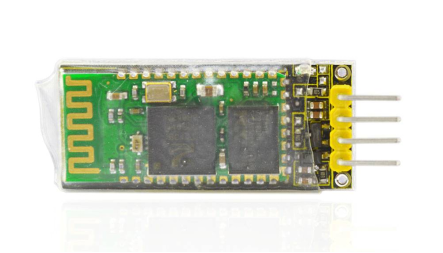
1.Introduction
This Bluetooth module can easily achieve serial wireless data transmission. Its operating frequency is among the most popular 2.4GHz ISM frequency band (i.e. Industrial, scientific and medical). It adopts Bluetooth 2.1+EDR standard. In Bluetooth 2.1, signal transmit time of different devices stands at a 0.5 seconds interval so that the workload of bluetooth chip can be reduced substantially and more sleeping time can be saved for bluetooth. This module is set with serial interface, which is easy-to-use and simplifying overall design/development cycle.
2.Specification
Bluetooth Protocol: Bluetooth 2.1+ EDR Standard
USB Protocol: USB v1.1/2.0
Operating Frequency: 2.4GHz ISM Frequency Band
Modulation Mode: Gauss Frequency Shift Keying
Transmit Power: ≤ 4dBm, Second Stage
Sensitivity: ≤-84dBm at 0.1% Bit Error Rate
Transmission Speed: 2.1Mbps(Max)/160 kbps(Asynchronous); 1Mbps/1Mbps(Synchronous)
Safety Feature: Authentication and Encryption
Supported Configuration: Bluetooth Serial Port (major and minor)
Supply Voltage: 5V DC 50mA
Operating Temperature: -20 to 55℃
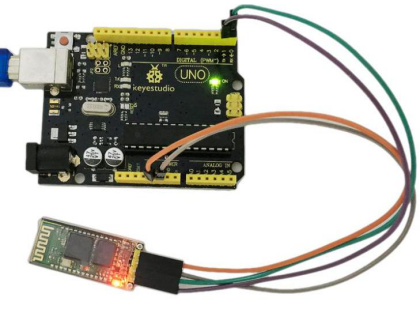
3.Connection Diagram
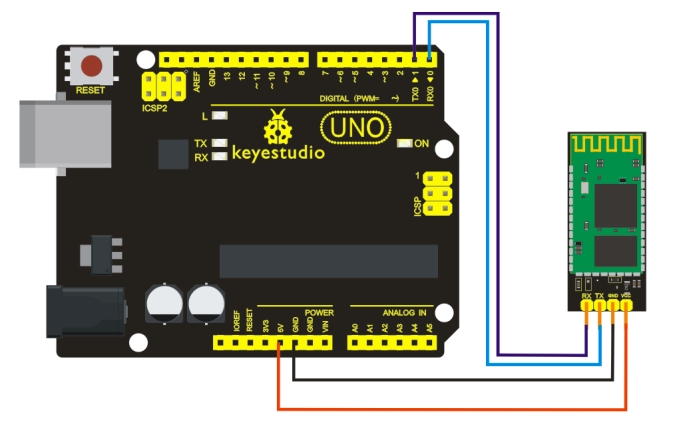
Pay more attention that here you must first upload the code to the board and then plug in the Bluetooth module, otherwise the program fails to compile.
4.Sample Code
int val;
int ledpin=13;

void setup()
{
    Serial.begin(9600);
    pinMode(ledpin,OUTPUT);
}

void loop()
{
    val=Serial.read();
    if(val=='a')
    {
        digitalWrite(ledpin,HIGH);
        delay(250);
        digitalWrite(ledpin,LOW);
        delay(250);
        Serial.println("keyestudio");
    }
}
5.Result
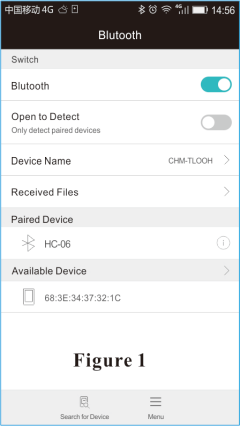
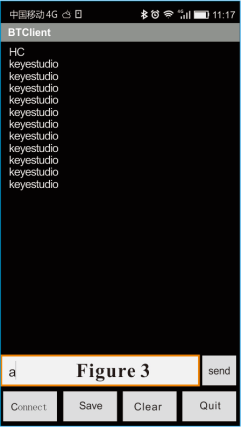
After power-on, power indicator D1 is on, and LED on Bluetooth module is blinking; open Bluetooth on mobile phone, pair them, input 1234, and finish pairing as shown in Figure 1 ; open APP—Bluetooth serial communication assistant, connect it to Bluetooth, select normal mode, complete connection, and LED on Bluetooth module is on as shown in Figure 2; input an “a” in the assistant, and display “keyestudio” in it as shown in Figure 3.
Figure 1:– ———————————Figure 2:————————— ———- ——-Figure 3: