Project 14 Counter
1. Description
Arduino 4-bit digital tube counter can record numbers within 0~9999. It features display speed, count mode adjustment as well as reset function. This module is wildly applied in real-time counter (such as button-press and DC motor rotation count), gaming and experiment equipment.
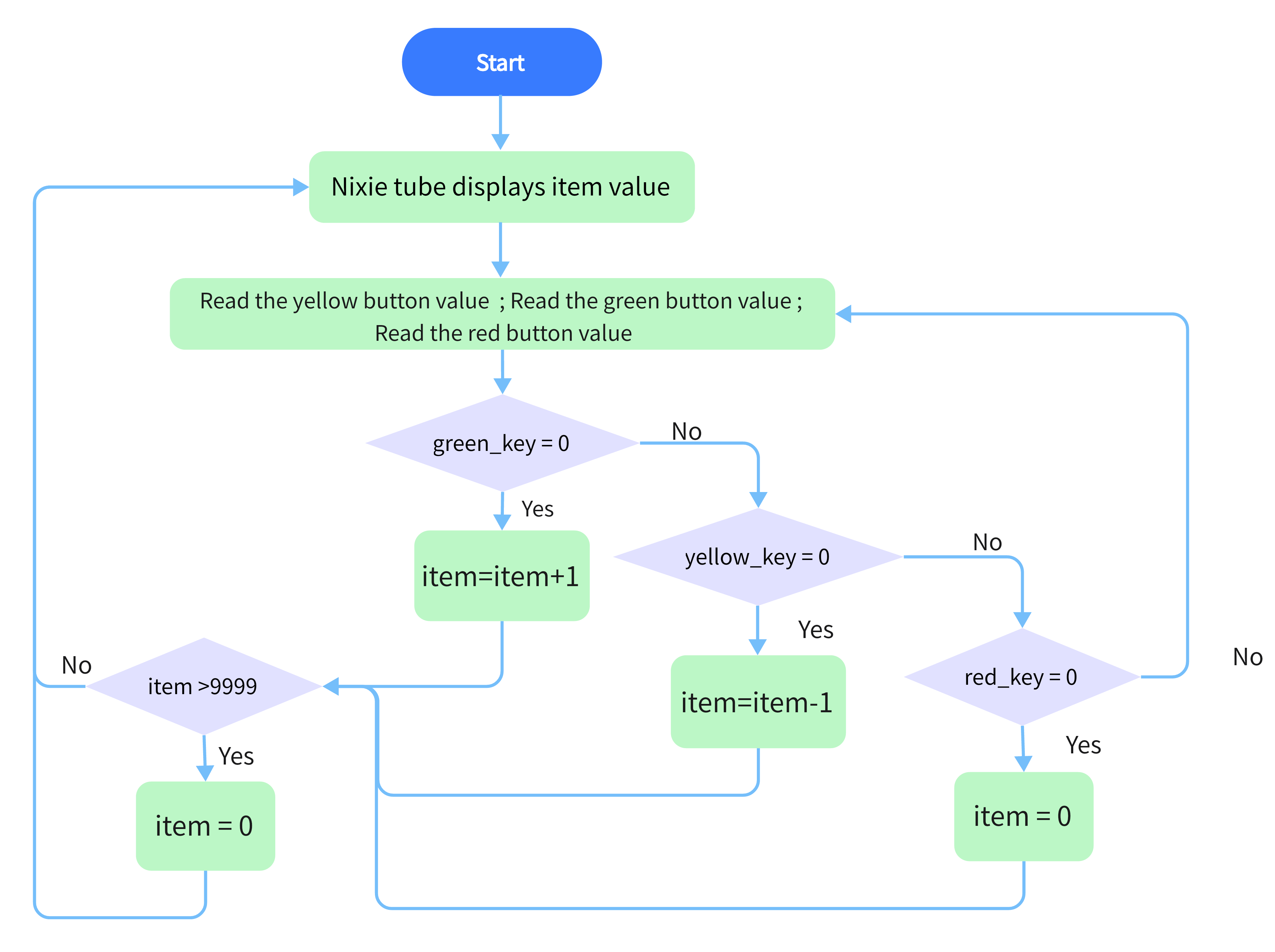
2. Flow Chart
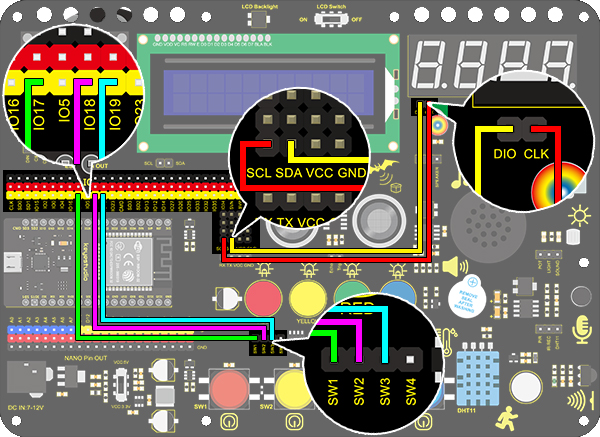
3. Wiring Diagram
4.Test Code
/*
  keyestudio ESP32 Inventor Learning Kit
  Project 14 Counter
  http://www.keyestudio.com
*/
#include "TM1650.h" //Upload TM1650 library file
int item = 0; //Displayed value
#define CLK 22    //pins definitions for TM1650 and can be changed to other ports
#define DIO 21
TM1650 DigitalTube(CLK,DIO);

int res = 17;     //Reset button
int subtract = 18;   //minus button
int  add = 19;       //plus button

void setup(){
    //set the pin connecting with button to input
  pinMode(res,INPUT);
  pinMode(add,INPUT);
  pinMode(subtract,INPUT);
  for(char b=0;b<4;b++){
    DigitalTube.clearBit(b);      //DigitalTube.clearBit(0 to 3); Clear bit display.
  }
}

void loop()
{
  DigitalTube.displayFloatNum(item);//Digital tube displays item value
  int red_key = digitalRead(res);            //Red button is the reset button
  int yellow_key = digitalRead(subtract);    //Yellow button is minus 1
  int green_key = digitalRead(add);           //Green button is plus 1
  if(green_key == 0)
  {
    item++;  //operate to add 1, item = item + 1
    delay(200);
  }
  if(yellow_key == 0)
  {
    item--;		//operate to reduce 1, item = item - 1
    delay(200);
  }
  if(red_key == 0)
  {
    item = 0;
    delay(200);
  }
  if (item > 9999)//return to zero when greater than 9999(excessing the display range)
  {
    item = 0;
  }
}
4. Test Result
After connecting the wiring and uploading code, press green button to add 1, yellow to minus 1, and red to reset. Press the button and hold it, and the displayed value will keep adding or reducing.