Project 26 Human Body Piano
1. Description
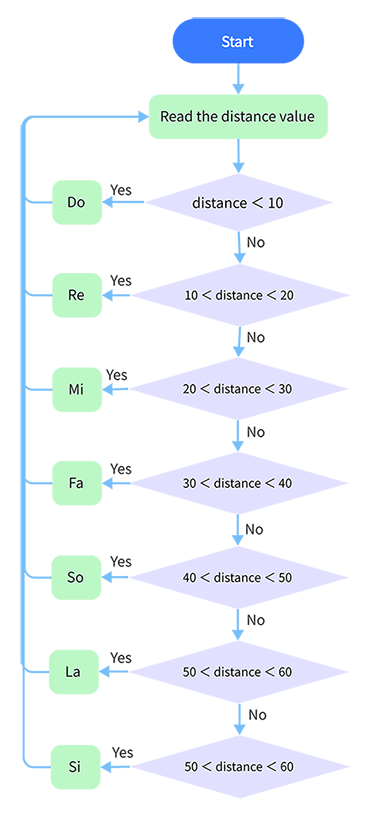
The analog piano includes a development board and an ultrasonic sensor. It enables to play different tones by detecting the position of your fingers. Thus, this module is able to stimulate a piano to perform music and songs.
2. Flow Chart
3. Wiring Diagram
4. Test Code
/*
  keyestudio ESP32 Inventor Learning Kit
  Project 26 Human Body Piano
  http://www.keyestudio.com
*/
int distance = 0; //Define a variable to receive the distance
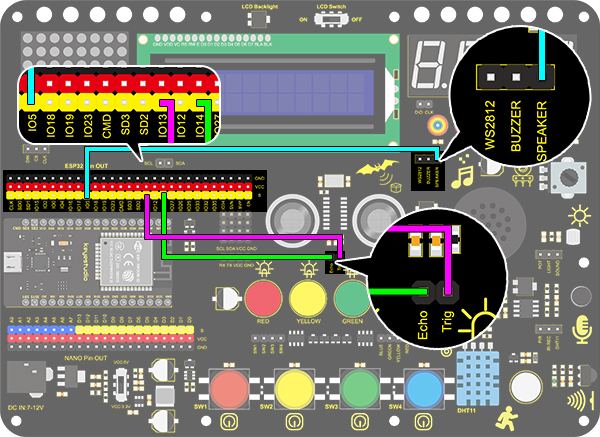
int EchoPin = 14; //Connect Echo pin to io14
int TrigPin = 13; //Connect Trig pin to io13

int beeppin = 5;

float checkdistance() { //Acquire distance
  // preserve a short low level to ensure a clear high pulse:
  digitalWrite(TrigPin, LOW);
  delayMicroseconds(2);
  // Trigger the sensor by a high pulse of 10um or longer
  digitalWrite(TrigPin, HIGH);
  delayMicroseconds(10);
  digitalWrite(TrigPin, LOW);
  // Read the signal from the sensor: a high level pulse
  //Duration is detected from the point sending "ping" command to the time receiving echo signal (unit: um).
  float distance = pulseIn(EchoPin, HIGH) / 58.00;  //Convert into distance
  delay(10);
  return distance;
}

void setup()
{
  Serial.begin(9600);//Set the baud rate to 9600
  pinMode(TrigPin, OUTPUT);//Set Trig pin to output
  pinMode(EchoPin, INPUT);  //Set Echo pin to input
}

void loop()
{
  distance = checkdistance();
  if(distance < 10)
  {
    tone(beeppin, 262);//Play DO
    delay(1000);
  }
  if(distance < 20 && distance > 10)
  {
    tone(beeppin, 294);//Play Re
    delay(1000);
  }
  if(distance < 30 && distance > 20)
  {
    tone(beeppin, 330);//Play Mi
    delay(1000);
  }
  if(distance < 40 && distance > 30)
  {
    tone(beeppin, 349);//Play fa
    delay(1000);
  }
  if(distance < 50 && distance > 40)
  {
    tone(beeppin, 392);//Play So
    delay(1000);
  }
  if(distance < 60 && distance > 50){
    tone(beeppin, 440);//Play La
    delay(1000);
  }
  if(distance < 70 && distance > 60)
  {
    tone(beeppin, 494);//Play Si
    delay(1000);
  }
  Serial.println(distance);
  noTone(beeppin);//Stop
}
5. Test Result
Connect the wirings and upload the code.
Play Do when the distance is less than 10.
Play Re when the distance is within 10~20.
Play Mi when the distance is within 20~30.
Play Fa when the distance is within 30~40.
Play So when the distance is within 40~50.
Play La when the distance is within 50~60.
Play Si when the distance is within 60~70.