Project 15 Responder
1. Description
This programmable responder inputs and receives signals through Arduino development board and a group of buttons, and it judges the correctness of answers via a LED. It is a good object to exercise students’ reaction ability and draw their attention to questions. If the answer is correct, the respondent obtains a lot scores.
Moreover, it simplifies teachers’ manipulation of question-grabbers and cuts answer clutters. It may even stimulate students’ interests in learning.
2. Flow Chart
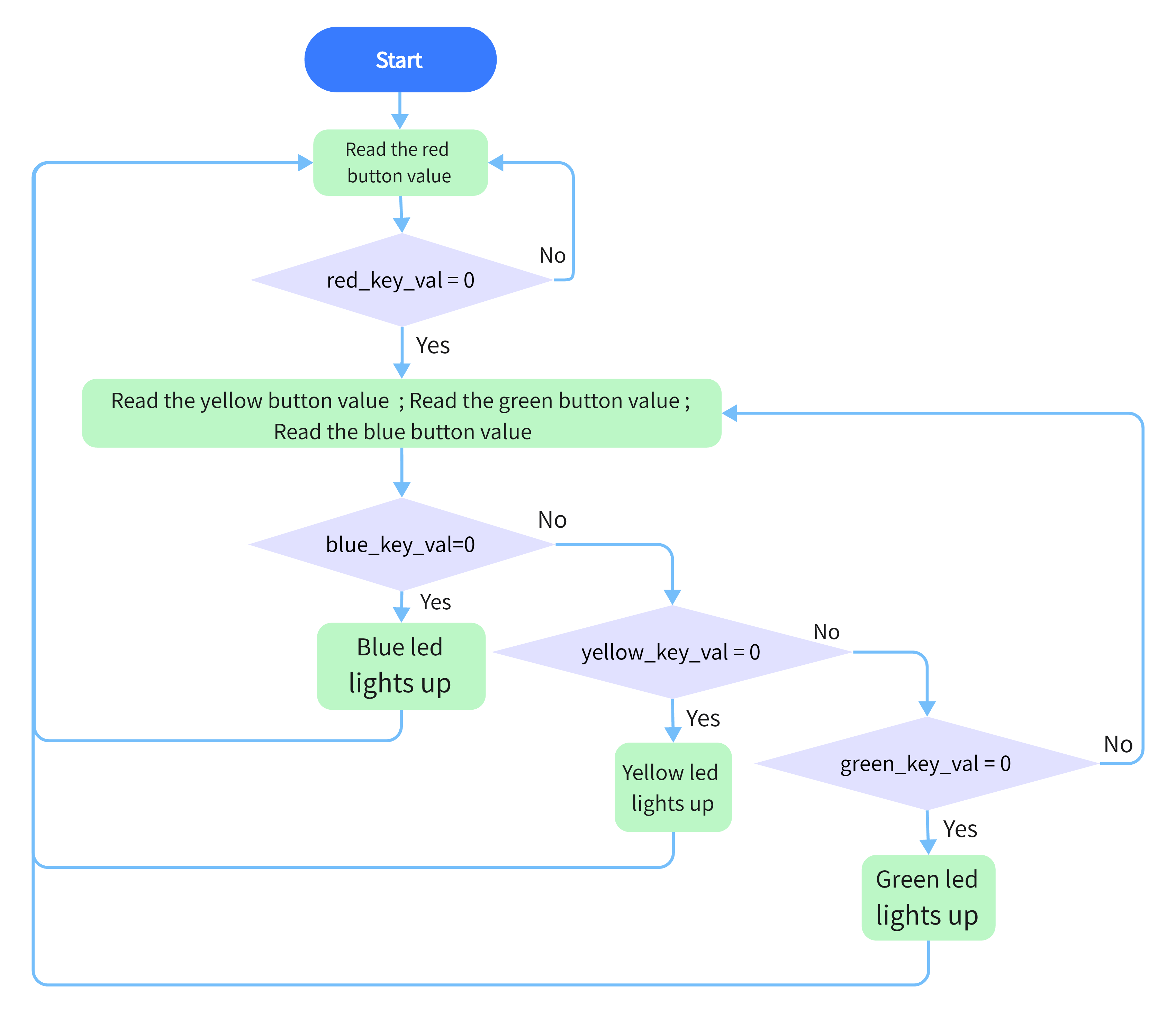
3. Wiring Diagram
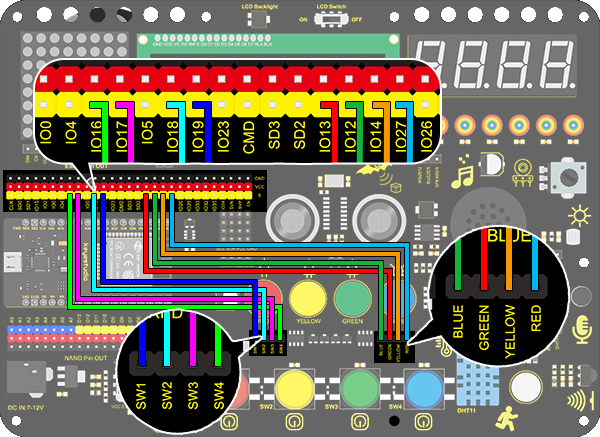
4. Test Code
/*
  keyestudio ESP32 Inventor Learning Kit
   Project 15 Responder
  http://www.keyestudio.com
*/
int blue_key = 16;	//Set blue button to connect pin D3
int  green_key= 17;	//Set green button to connect pin D4
int yellow_key = 18;	//Set yellow button to connect pin D5
int red_key = 19;	//Set red button to connect pin D6

int blue_led = 12;	//Set blue LED to connect pin D7
int green_led = 13;	//Set green LED to connect pin D8
int yellow_led = 14;	//Set yellow LED to connect pin D9
int red_led = 27;	//Set red LED to connect pin D10

void setup()
{
    //Set the pin connecting with button to input
  pinMode(blue_key,INPUT);
  pinMode(green_key,INPUT);
  pinMode(yellow_key,INPUT);
  pinMode(red_key,INPUT);
 	//Set the pin connecting with LED to output
  pinMode(blue_led,OUTPUT);
  pinMode(green_led,OUTPUT);
  pinMode(yellow_led,OUTPUT);
  pinMode(red_led,OUTPUT);

}

void loop()
{
  int red_key_val = digitalRead(red_key);	//Read the red button value
  digitalWrite(red_led,HIGH);				//Red LED lights up
  if(red_key_val == 0)
  {				//Determine whether the red button is pressed
    digitalWrite(red_led,LOW);		//All LED go off
    digitalWrite(blue_led,LOW);
    digitalWrite(green_led,LOW);
    digitalWrite(yellow_led,LOW);
    delay(200);
    while(1)
    {						//while()loop
      int blue_key_val = digitalRead(blue_key);		//Read the button value
      int green_key_val = digitalRead(green_key);
      int yellow_key_val = digitalRead(yellow_key);
      if(blue_key_val == 0)
      {						//Determine whether the blue button is pressed
        digitalWrite(blue_led,HIGH);				//Blue LED lights up
        break;										//Exit loop
      }
      if(green_key_val == 0)
      {
        digitalWrite(green_led,HIGH);
        break;
      }
      if(yellow_key_val == 0)
      {
        digitalWrite(yellow_led,HIGH);
        break;
      }
    }
  }
}
5. Test Result
Let’s simulate a quick-answer game.
Press the red button to turn off all LED lights. Then we can select the yellow, green and blue buttons to turn on the corresponding LED lights. The person whose LED light turns on first can answer first.