Project 8 Music Performer
1. Description
In this project, we will use a power amplifier speaker to play music. This speaker can not only play simple songs, but also perform what you desire. Thus, you can program other interesting codes in the project to accomplish splendid learning outcomes.
2. Working Principle
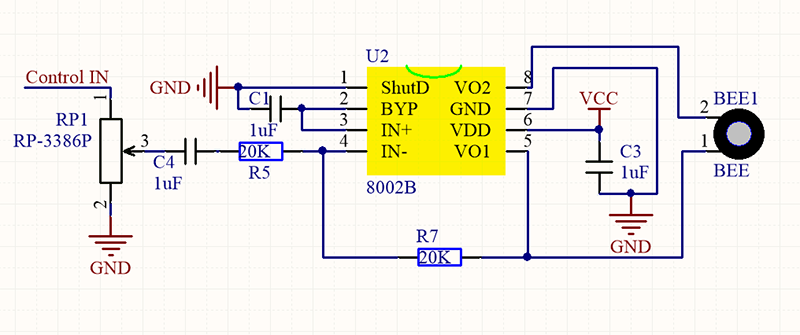
The electrical signal is input from pin 1 of RP1 (adjusts signal intensity, which is also the sound volume).
After coupling in C4 and passing R5, the signal reaches IN- pin of 8002B, in which it is operationally amplified and output to BEE1 speaker.
Frequency Comparison Table in C
Note |
Frequency(Hz) |
Note |
Frequency(Hz) |
Note |
Frequency(Hz) |
|---|---|---|---|---|---|
Flat 1 Do |
262 |
Natural 1 Do |
523 |
Sharp 1 Do |
1047 |
Flat 2 Re |
294 |
Natural 2 Re |
587 |
Sharp 2 Re |
1175 |
Flat 3 Mi |
330 |
Natural 3 Mi |
659 |
Sharp 3 Mi |
1319 |
Flat 4 Fa |
349 |
Natural 4 Fa |
698 |
Sharp 4 Fa |
1397 |
Flat 5 So |
392 |
Natural 5 So |
784 |
Sharp 5 So |
1568 |
Flat 6 La |
440 |
Natural 6 La |
880 |
Sharp 6 La |
1760 |
Flat 7 Si |
494 |
Natural 7 Si |
988 |
Sharp 7 Si |
1967 |
3. Wiring Diagram
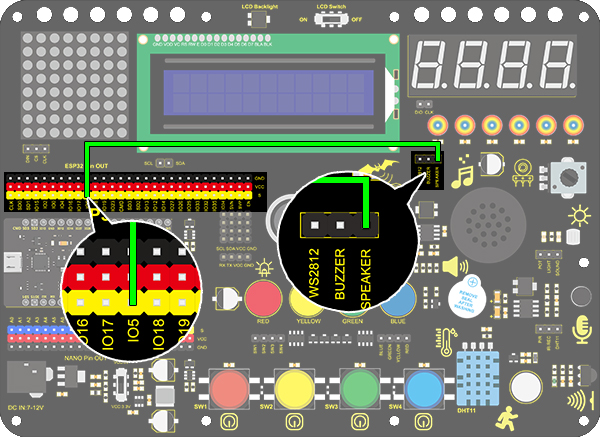
4. Test Code
/*
  keyestudio ESP32 Inventor Learning Kit
  Project 8.1 Music Performer
  http://www.keyestudio.com
*/
int beeppin = 5; //Define the speaker pin to IO5

void setup()
{
  pinMode(beeppin, OUTPUT);//Define the IO5 port to output mode
}

void loop()
{
  tone(beeppin, 262);//Flat DO plays 500ms
  delay(500);
  tone(beeppin, 294);//Flat Re plays 500ms
  delay(500);
  tone(beeppin, 330);//Flat Mi plays 500ms
  delay(500);
  tone(beeppin, 349);//Flat Fa plays 500ms
  delay(500);
  tone(beeppin, 392);//Flat So plays 500ms
  delay(500);
  tone(beeppin, 440);//Flat La plays 500ms
  delay(500);
  tone(beeppin, 494);//Flat Si plays 500ms
  delay(500);
  noTone(beeppin);//Stop for 1s
  delay(1000);
}
5. Test Result
After uploading code and powering on, the amplifier circularly plays music tones with corresponding frequency: DO, Re, Mi, Fa, So, La, Si.
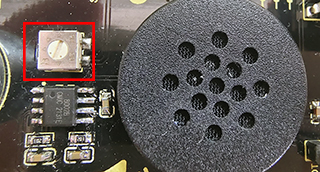
Power amplifier sound adjustment:
**There is a potentiometer next to the speaker. We can adjust the sound of the speaker by twisting it. ** (Note: Please use appropriate strength to adjust it, so as not to break the potentiometer)
6. Knowledge Expansion
Let’s play a birthday song. The wirings remain unchanged.
Numbered musical notation:
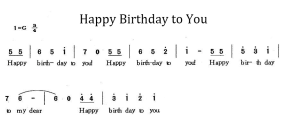
Comparison Diagram of Flat, Natural and Sharp

/*
  keyestudio ESP32 Inventor Learning Kit
  Project 8.2 Music Performer
  http://www.keyestudio.com
*/
int beeppin = 5; //Define the speaker pin to IO5
// do、re、mi、fa、so、la、si

int doremi[] = {262, 294, 330, 370, 392, 440, 494,      //Falt 0-6
                523, 587, 659, 698, 784, 880, 988,      //Natural 7-13
                1047,1175,1319,1397,1568,1760,1967};    //Sharp 14-20
int happybirthday[] = {5,5,6,5,8,7,5,5,6,5,9,8,5,5,12,10,8,7,6,11,11,10,8,9,8};   //Find the number in arrey doremi[] according to the numbered musical notation
int meter[] = {1,1,2,2,2,4, 1,1,2,2,2,4, 1,1,2,2,2,2,2, 1,1,2,2,2,4};    // Beats

void setup()
{
  pinMode(beeppin, OUTPUT); //Set IO5 pin to output mode
}

void loop()
{
  for( int i = 0 ; i <= 24 ;i++)
  {       //i<=24, because there are only 24 tones in this song
    //Use tone()function to generate a waveform in "frequency"
   tone(beeppin, doremi[happybirthday[i] - 1]);
   delay(meter[i] * 200); //Wait for 1000ms
   noTone(beeppin);//Stop singing
  }
}