プロジェクト25 超音波距離計
1. 説明
この超音波距離計は、音波を発信し、そのエコーを受信することで障害物までの距離を測定します。つまり、距離は即時の値ではなく、発信と受信の時間差を理論的に計算して得られる観測値です。
超音波は物体の形状検出、自動ドアの設置、流速や圧力の推定に利用できます。
さらに、コンピュータとの連携も可能です。そのため、測定値はArduinoボードを介してコンピュータに送信できます。
日常生活では、モーター、サーボ、LEDだけでなく、自動ナビゲーション、制御、セキュリティ監視システムなどにも広く使われています。
2. 動作原理
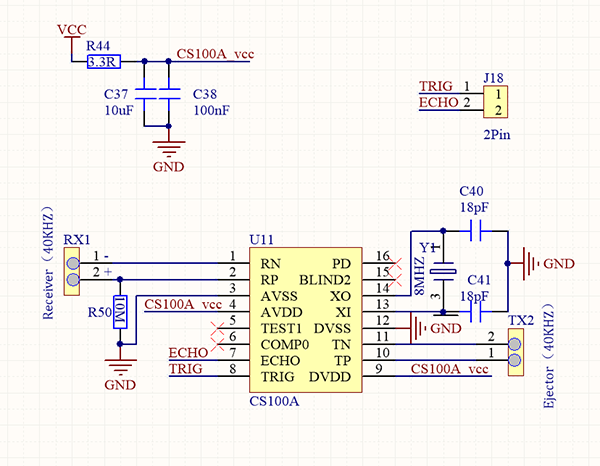
ご存知の通り、超音波は高周波の人間には聞こえない音波信号の一種です。コウモリのように、このモジュールは波の発信とエコー受信の時間差を計算して障害物までの距離を測定します。
最大距離: 3M
最小距離: 5cm
検出角度: ≤15°
3. 配線図
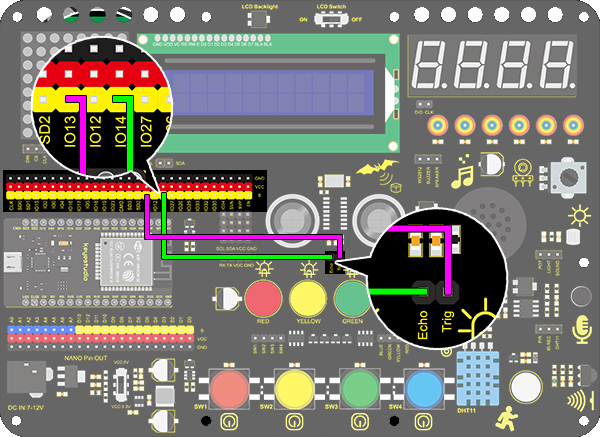
4. テストコード
/*
  keyestudio ESP32 Inventor Learning Kit
  Project 25.1:Ultrasonic Rangefinder
  http://www.keyestudio.com
*/
int distance = 0; //Define a variable to receive the diatance value
int EchoPin = 14; //Connect Echo pin to io14
int TrigPin = 13; //Connect Trig pin to io13

float checkdistance() { //Acquire the distance
  // preserve a short low level to ensure a clear high pulse:
  digitalWrite(TrigPin, LOW);
  delayMicroseconds(2);    //Delay 2um
  //Trigger the sensor by a high pulse of 10um or longer
  digitalWrite(TrigPin, HIGH);
  delayMicroseconds(10);		//Delay 10um
  digitalWrite(TrigPin, LOW);
  //Read the signal from the sensor: a high level pulse
  //Duration is detected from the point sending "ping" command to the time receiving echo signal (unit: um).
  float distance = pulseIn(EchoPin, HIGH) / 58.00;  //Convert into distance
  delay(10);
  return distance; //Return the diatance value
}

void setup()
{
  Serial.begin(9600);//Set the baud rate to 9600
  pinMode(TrigPin, OUTPUT);//Set Trig pin to output
  pinMode(EchoPin, INPUT);  //Set Echo pin to input
}

void loop()
{
  distance = checkdistance();   //Assign the read value to "distance"
  if (distance < 4 || distance >= 400) //Display "-1" if exceeding the detection range
  {
    distance = -1;
  }
  Serial.print("ditance: ");
  Serial.print(distance);
  Serial.println(" CM");
  delay(200);
}
5. テスト結果
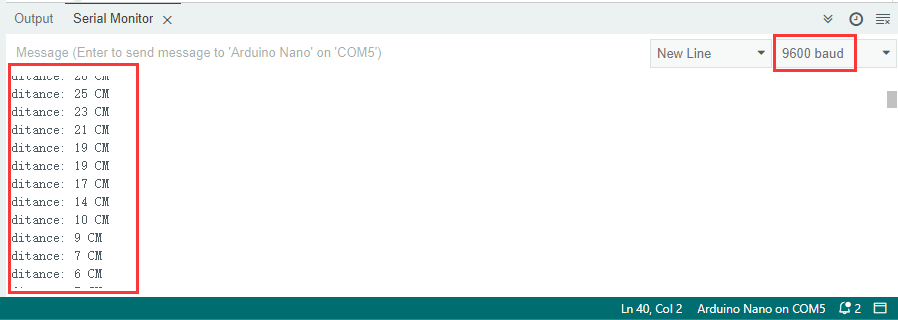
配線を接続しコードをアップロードした後、シリアルモニターを開きボーレートを9600に設定すると、シリアルポートに距離の値が表示されます。
6. 知識の拡張
距離計を作ってみましょう。
LCD 1602に文字を表示します。プログラムでは(3,0)に「Keyestudio」、(0,1)に「distance:」を表示し、(9,1)に距離の値を表示します。
値が100(または10)未満の場合、3桁目(または2桁目)の残像が残るため、特定の条件を判定するために「if」文が必要です。
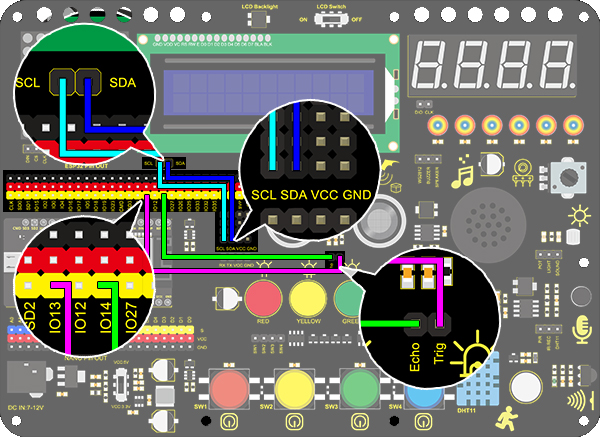
配線図:
コード:
/*
  keyestudio ESP32 Inventor Learning Kit
  Project 25.2:Ultrasonic Rangefinder
  http://www.keyestudio.com
*/
#include <Wire.h>
#include <LiquidCrystal_I2C.h>
LiquidCrystal_I2C lcd(0x27,16,2); //set the LCD address to 0x27 for a 16 chars and 2 line display

int distance = 0; //Define a variable to receive the diatance value
int EchoPin = 14; //Connect Echo pin to io14
int TrigPin = 13; //Connect Trig pin to io13
float checkdistance() { //Acquire the distance
  // preserve a short low level to ensure a clear high pulse:
  digitalWrite(TrigPin, LOW);
  delayMicroseconds(2);
  //Trigger the sensor by a high pulse of 10um or longer
  digitalWrite(TrigPin, HIGH);
  delayMicroseconds(10);
  digitalWrite(TrigPin, LOW);
  // Read the signal from the sensor: a high level pulse
  //Duration is detected from the point sending "ping" command to the time receiving echo signal (unit: um).
  float distance = pulseIn(EchoPin, HIGH) / 58.00;  //Convert into distance
  delay(10);
  return distance;
}

void setup()
{
  	Serial.begin(9600);//Set the baud rate to 9600
  	pinMode(TrigPin, OUTPUT);//Set Trig pin to output
  	pinMode(EchoPin, INPUT);  //Set Echo pin to input
    lcd.init(); // initialize the lcd
    // Print a message to the LCD.
    lcd.backlight();
    lcd.setCursor(3,0);
    lcd.print("Keyestudio");
}

void loop()
{
  distance = checkdistance();

  if (distance < 2 || distance >= 400) //Display "-1" if exceeding the detection range
  {
    distance = -1;
  }
  if(distance < 100 && distance > 10){             //Eliminate the shadow of the third digit when the value drops to two digits
    lcd.setCursor(11,1);
    lcd.print(" ");
  }
  if(distance < 10)//Eliminate two-digit shadows when the value drops to one digit
  {
    lcd.setCursor(10,1);
    lcd.print(" ");
  }
  lcd.setCursor(0,1);
  lcd.print("distance:");
  lcd.setCursor(9,1);
  lcd.print(distance);
  delay(200);
}