プロジェクト28 インテリジェントゲート
1. 説明
インテリジェントゲートは、MCUと超音波センサーを統合したインテリジェント駐車場システムであり、車両の距離に応じてゲートを自動的に制御し、車両の出入りをより適切に管理します。
一定の距離に達すると、MCUはセンサーから信号を受信し、信号の強度から距離を推定します。車が近づくまたは離れる場合、MCUはサーボを介してゲートを開閉します。
2. フローチャート
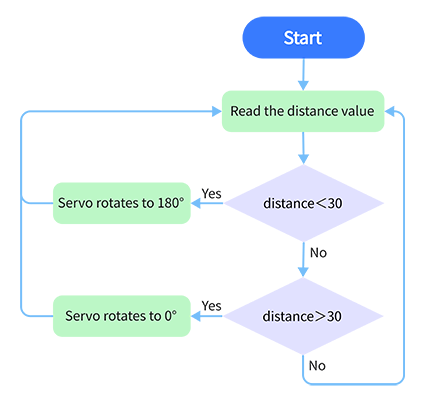
3. 配線図
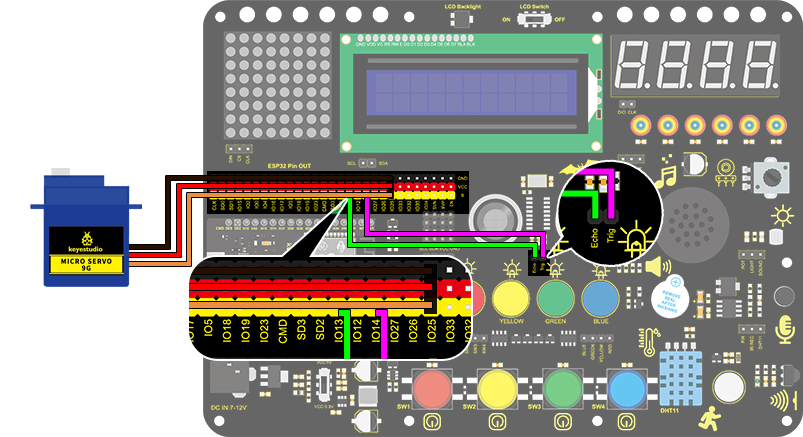
4. テストコード
/*
  keyestudio ESP32 Inventor Learning Kit
  Project 28 Intelligent Gate
  http://www.keyestudio.com
*/
#define servo_pin  25
int distance = 0; //Define a variable to receive the distance
int EchoPin = 14; //Connect Echo pin to IO14
int TrigPin = 13; //Connect Trig pin to IO13

//Ultrasonic ranging program
float checkdistance() { //Acquire distance
  //preserve a short low level to ensure a clear high pulse:
  digitalWrite(TrigPin, LOW);
  delayMicroseconds(2);
  //Trigger the sensor by a high pulse of 10um or longer
  digitalWrite(TrigPin, HIGH);
  delayMicroseconds(10);
  digitalWrite(TrigPin, LOW);
  //Read the signal from the sensor: a high level pulse
  //Duration is detected from the point sending "ping" command to the time receiving echo signal (unit: um).
  float distance = pulseIn(EchoPin, HIGH) / 58.00;  //Convert into distance
  delay(10);
  return distance;
}

//Servo rotation program
void Set_Angle(int angle_val) //Impulse function
{
  int pulsewidth = map(angle_val, 0, 180, 500, 2500); //Map Angle to pulse width
  for (int i = 0; i < 10; i++) { //Output a few more pulses
    digitalWrite(servo_pin, HIGH);//Set the servo interface level to high
    delayMicroseconds(pulsewidth);//The number of microseconds of delayed pulse width value
    digitalWrite(servo_pin, LOW);//Lower the level of servo interface
    delay(20 - pulsewidth / 1000);  //Add the bracket
  }
}

void setup()
{
  // put your setup code here, to run once:
  pinMode(servo_pin,OUTPUT);
  pinMode(TrigPin, OUTPUT);//Set Trig pin to output
  pinMode(EchoPin, INPUT);  //Set Echo pin to input
}

void loop()
{
  // put your main code here, to run repeatedly:
 distance = checkdistance();
 Serial.println();
  if(distance < 30)
  {
    Set_Angle(180);
    delay(5000);//Wait for 5s
  }
  if(distance > 30)
  {
    Set_Angle(0);
  }
}
5. テスト結果
配線を接続しコードをアップロードすると、検出距離が30cm未満の場合、サーボは5秒間180°回転します。逆に、距離が30cm以上の場合はサーボが0°に回転します。