Project 1 Who’s blinking
1.Introduction
As the first lesson of this kit, we will begin with something simple. In this lesson, all you need to do is to connect an LED to one of the digital pins of main board. With the program we provided here, you can easily control the blinking of an LED.
2.Hardware required
EASY plug controller Board *1
EASY plug cable *1
USB cable *1
EASY plug Piranha LED Module *1
First, let’s take a look at this Piranha LED Module.
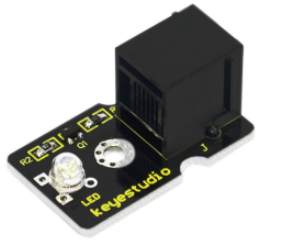
This is a special LED module. When you connect it to ARDUINO, after program, it can emit beautiful light. Of course, you can also control it using PWM. It will be like fireflies at night. Isn’t it cool? We can also combine it with other sensors to do various interesting interactive experiments. Below are its specifications:
Module type: digital
Working voltage: 5V
Distance between pins: 2.54mm
Size: 33.7*20mm
Weight: 3g
3.Connection Diagram
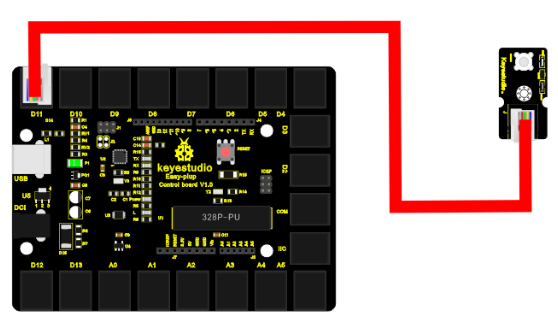
Now, let’s connect this module to the D11 port of the controller board using the EASY plug cable, just as simple as that!
4.Sample Code
Connect the board to your PC using the USB cable; copy below code into Arduino IDE, and click upload to upload it to your board.
int ledPin = 11; // define digital pin 11

void setup()
{
	pinMode(ledPin, OUTPUT);// define LED pin as output
}

void loop()
{
    analogWrite(ledPin,255); //set the LED on, regulate light brightness, ranging from 0-255, 255 is the brightest
    delay(1000); // wait for a second
    digitalWrite(ledPin, LOW); // set the LED off
    delay(1000); // wait for a second
}
5.Result
The LED will be on for one second, and then off for one second with an interval of one second, just like a shining eye blinking.