Project 18 Somebody is in this area
1.Introduction
In this lesson, we will combine PIR Motion Sensor, 1602 I2C Module and Piranha LED Module to make a device to detect whether there is someone or some animals around. The principle of this experiment can be applied in automatic switch of corridor light and burglar alarm etc.
2.Hardware required
EASY plug controller Board *1
USB cable *1
EASY plug cable *3
EASY plug Piranha LED Module *1
EASY plug 1602 I2C Module *1
EASY plug PIR Motion Sensor *1
Below is a brief introduction of EASY plug PIR Motion Sensor.
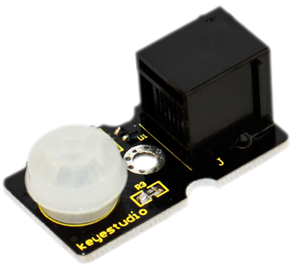
Pyroelectric infrared motion sensor can detect infrared signals from a moving person or moving animal, and outputs switching signals. It has advantages of low power consumption, good concealing, low cost etc. It can be applied to a variety of occasions to detect the movement of human body. Below are its specifications:
Input Voltage: 3.3 ~ 5V, 6V Maximum
Working Current: 15uA
Working Temperature: -20 ~ 85 ℃
Output Voltage: High 3V, low 0V
Output Delay Time (High Level): About 2.3 to 3 Seconds
Detection angle: 100 °
Detection distance: 7 meters
Output Indicator LED (When output HIGH, it will be ON)
Pin limit current: 100mA
Size: 36.4*20mm
Weight: 4g
3.Connection Diagram
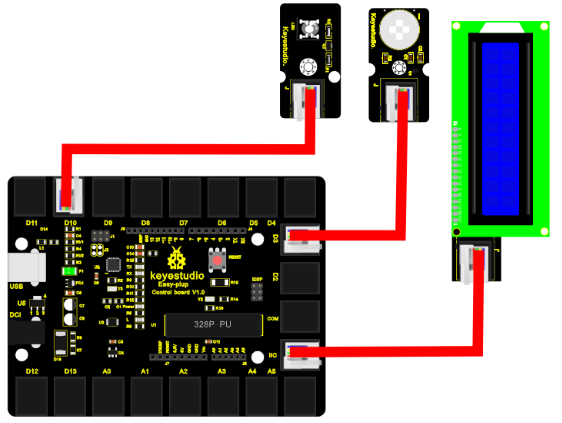
Now, connect the LED module to the D10 port of the controller board, motion sensor module to D3, and LCD module to IIC port using the EASY plug cables.
4.Sample Code
Connect the board to your PC using the USB cable; copy below code into Arduino IDE, and click upload to upload it to your board.
#include <Wire.h>  // place file “Wire.h” under the “library” directory of Arduino
#include <LiquidCrystal_I2C.h> // place file “LiquidCrystal_I2C.h” under the “library” directory of Arduino
#define sensorPin 3
#define indicator 10
LiquidCrystal_I2C lcd(0x27,16,2);  // set the LCD address to 0x27 for a 16 chars and 2 line display

void setup()
{
  pinMode(sensorPin,INPUT);
  pinMode(indicator,OUTPUT);
  lcd.init();                      // initialize the lcd
  lcd.init();
  // Print a message to the LCD.
  lcd.backlight();
}


void loop()
{
  byte state = digitalRead(sensorPin);
  digitalWrite(indicator,state);
  if(state == 1)
  {
  lcd.setCursor(2,0);
  lcd.print("Somebody is");
  lcd.setCursor(2,1);
  lcd.print("in this area!");
  }
  else if(state == 0)
  {
   lcd.setCursor(2,0);
  lcd.print("  No one!    ");
  lcd.setCursor(2,1);
  lcd.print("  No one!    ");
  }
  delay(500);
}
5.Result
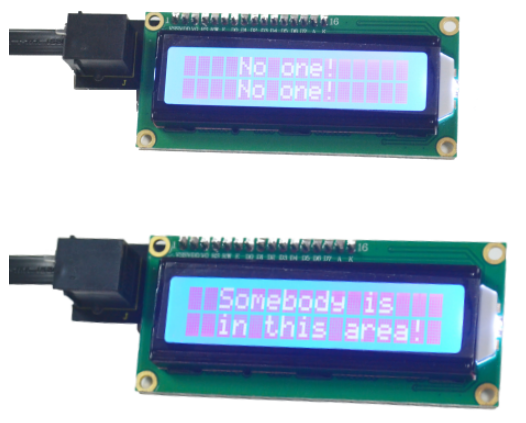
After power is on, when there is no movement near the motion sensor, LCD displays “no one”, and piranha LED is off; when there is someone moving near the motion sensor, LCD will display “somebody is in this area!”, and the LED will be turn on.