Project 14 Transmit a signal
1.Introduction
In the above lesson, we use a remote controller as an IR transmitting device. Here, we introduce you an IR Transmitter Module. IR Transmitter is a critical part of a remote controller that transmits IR signal. It’s usually used with the receiver module to complete a full transceiving process. Here, due to limited resource of EASY plug main controller board (requires two), we will do a simple IR transmitting test for you to better understand IR communication.
2.Hardware required
EASY plug controller Board x1
USB cable x1
EASY plug cable x2
EASY plug IR Transmitter Module x1
EASY plug Digital Push Button x1 (not included, refer to EASY plug starter kit)
Below is a brief introduction of IR transmitter module.
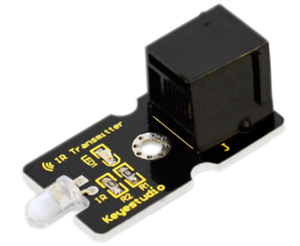
Infrared transmitting tube, also known as infrared emitting diode, belongs to the diode family. It is a light-emitting device that can directly convert electrical energy to near-infrared light and emit. Its structure and principle is similar to an LED. Only material of semiconductor is different. This module is usually used together with IR receiver module. Below are its specifications:
Power Supply: 3-5V
Infrared center frequency: 850nm-940nm
Infrared emission angle: about 20degree
Infrared emission distance: about 1.3m (5V 38Khz)
Interface socket: JST PH2.0
Mounting hole: inner diameter is 3.2mm, spacing is 15mm
Size: 43.8*20mm
Weight: 3g
3.Connection Diagram
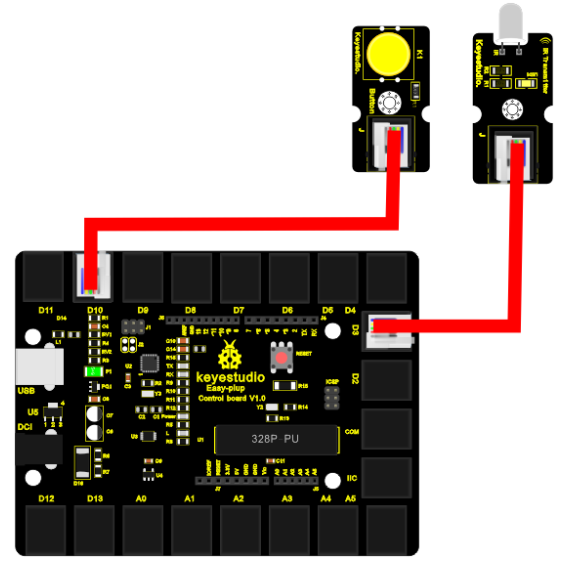
Now, connect the button module to the D10 port of the controller board, and IR Transmitter Module to D3 port using the EASY plug cables.
4.Sample Code
Connect the board to your PC using the USB cable; copy below code into Arduino IDE, and click upload to upload it to your board.
#include <IRremote.h>
IRsend irsend;
int button = 10;

void setup()
{
    Serial.begin(9600);
    pinMode(button,INPUT);
}

void loop()
{
    if(digitalRead(button)==LOW)
    {
        irsend.sendSony(0xa90, 12); // Sony TV power code
        delay(100);
    }
}
5.Result
After the above are done, press the button, the LED on the module flashes, and the IR transmitter module will transmit “A90” as programmed in the code. If you have an IR receiving device, you can receive “A90”. Release the button, it will stop the transmitting and the LED on the module will be off.