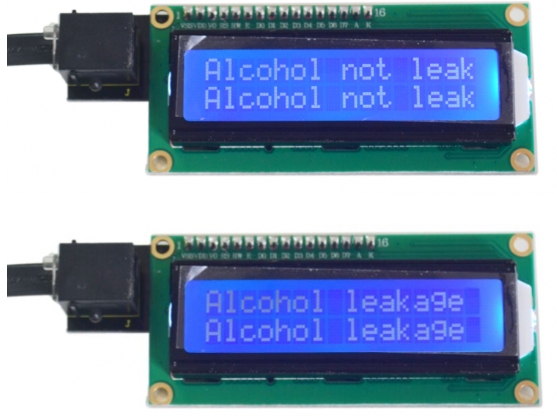
Project 17 Did he drink
1.Introduction
In previous two lessons, we introduced you two types of gas sensors. Here, we will introduce you another gas sensor especially used for detecting alcohol. Also, instead of an LED to tell whether there is alcohol or not, we will use an LCD.
2.Hardware required
EASY plug controller Board x1
USB cable x1
Some alcohol (not included)
A piece of cloth (not included)
EASY plug cable x2
EASY plug 1602 I2C Module x1
ASY plug Analog Alcohol Sensor x1
First, let’s learn a little bit about this analog alcohol sensor.
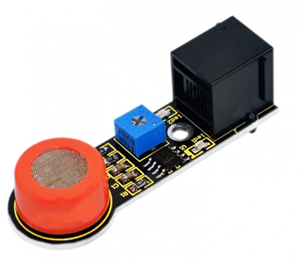
This analog gas sensor - MQ3 is suitable for detecting alcohol. It can be used in a Breath analyzer. Also it has high sensitivity to alcohol and low sensitivity to Benzine. The sensitivity can be adjusted by the potentiometer. Below are its specifications:
Power supply: 5V
Interface type: Analog
Quick response and High sensitivity
Simple drive circuit
Stable and long service life
Size: 56*15mm
Weight: 6g
3.Connection Diagram
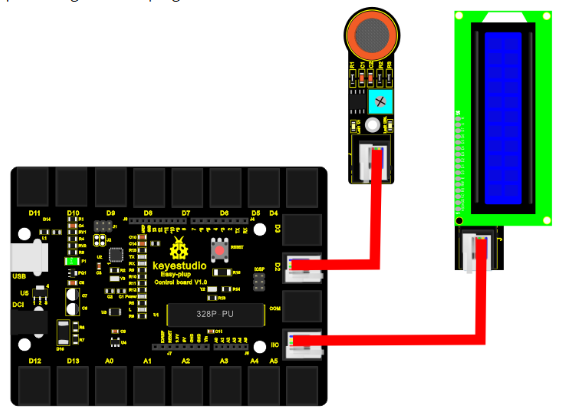
Now, connect the alcohol sensor to the D2 port of the controller board, and LCD module to IIC port using the EASY plug cables.
4.Sample Code
Connect the board to your PC using the USB cable; copy below code into Arduino IDE, and click upload to upload it to your board.
#include <Wire.h>
#include <LiquidCrystal_I2C.h>
int gas_din=2;
LiquidCrystal_I2C lcd(0x27,16,2);  // set the LCD address to 0x27 for a 16 chars and 2 line display

void setup()
{
  pinMode(gas_din,INPUT);
  Serial.begin(9600);
  lcd.init();                      // initialize the lcd
  lcd.init();
  // Print a message to the LCD.
  lcd.backlight();
}

void loop()
{
  if(digitalRead(gas_din)==LOW)
  {
   lcd.setCursor(0,0);
   lcd.print("Alcohol leakage ");
   lcd.setCursor(0,1);
   lcd.print("Alcohol leakage ");
  }
  else
  {
   lcd.setCursor(0,0);
   lcd.print("Alcohol not leak");
   lcd.setCursor(0,1);
   lcd.print("Alcohol not leak");
  }
  delay(500);
}
5.Result
After all the above are done, you can see the power LED1 on the module is on, for LED2 on the module, you need to use a screw driver to adjust the knob for LED2 to be in a “off” state when it’s about to be turned on. Now, the LCD is displaying “Alcohol not leak”; spill some alcohol on the cloth and place it on the sensing area of the sensor, you can see the LCD displays “Alcohol leakage”.