Project 20 How humid & hot is the air
1.Introduction
Temperature and humidity is vital to our well beings. In this lesson, we will learn how to measure the temperature and humidity of our surroundings using a DHT11 Temperature and Humidity Sensor and a 1602 LCD.
2.Hardware required
EASY plug controller Board x1
USB cable x1
EASY plug cable x2
EASY plug 1602 I2C Module x1
EASY plug DHT11 Temperature and Humidity Sensor x1
We will first learn a little about this DHT11 Temperature and Humidity Sensor.
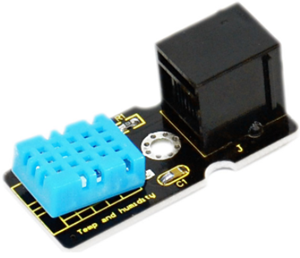
This DHT11 Temperature and Humidity Sensor features a digital temperature and humidity sensor complex with a calibrated digital signal output. It can detect temperature and humidity of the surroundings. It has excellent quality, fast response, anti-interference ability and high cost performance advantages. Below are its specifications:
Supply Voltage: +5 V
Temperature range: 0-50 °C error of ± 2 °C
Humidity: 20-90% RH ± 5% RH error
Interface: Digital
Size: 42*20mm
Weight: 4g
3.Connection Diagram
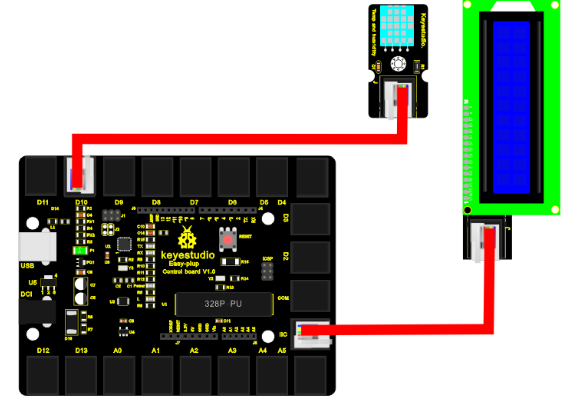
Now, connect the DHT11 module to the D10 port of the controller board, and LCD module to IIC port using the EASY plug cables.
4.Sample Code
Connect the board to your PC using the USB cable; copy below code into Arduino IDE, and click upload to upload it to your board.
#include <Wire.h>    // Place file “Wire.h” under the directory “library” of Arduino
#include <LiquidCrystal_I2C.h>  // Place file “LiquidCrystal_I2C.h” under the directory “library” of Arduino
#include <dht11.h>     //Place file “dht11.h” under the directory “library” of Arduino
dht11 DHT;
#define DHT11_PIN 10
LiquidCrystal_I2C lcd(0x27,16,2);  // set the LCD address to 0x27 for a 16 chars and 2 line display

void setup()
{
  lcd.init();                      // initialize the lcd
  lcd.init();
  // Print a message to the LCD.
  lcd.backlight();
  lcd.setCursor(0,0);
  lcd.print("Humid(%),Temp(C)");
}

void loop()
{
  int chk;
  chk = DHT.read(DHT11_PIN);    // READ DATA
  lcd.setCursor(3,1);
  lcd.print(DHT.humidity,1);
  lcd.setCursor(11,1);
  lcd.print(DHT.temperature,1);
  delay(1000);
}
5.Result
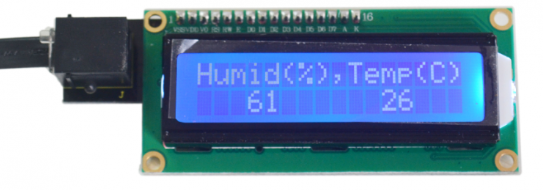
After power is on, first line of LCD displays “Humid(%),Temp©”, second line displays current temperature and humidity. Values will be updated per second.