Project 26 Ambient Light
1.Overview
This lesson is a little bit similar to the previous illumination test by a photoresistor. But this time we will use keystudio TEMT6000 light sensor whose sensitivity is better than a photoresistor. You will learn how to use a TEMT6000 sensor and micro:bit to test the ambient light. The analog value will show on the micro:bit LED matrix or on the CoolTerm monitor.
2.Components Required
Micro:bit Main Board*1
USB Cable*1
TEMT6000 Ambient Light Sensor*1
Alligator Clip Wire*3
3.Component Introduction
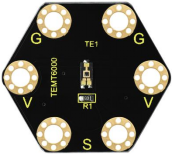
About keyestudio TEMT6000 Light Module For BBC micro:bit:
This keyestudio TEMT6000 light module is fully compatible with micro:bit control board. When using, connect the module to micro:bit control board using Crocodile clip line.
This module is mainly composed of a highly sensitive visible photocell (NPN type) triode, which can magnify the captured tiny light illumination changes by about 100 times, and is easily recognized by the microcontroller for AD conversion.
Its response to visible light illumination is similar to that of the human eye, so that can detect the intensity of ambient light.It is an analog signal output device.
There are total 6 rings on the module. Note that two G rings, two V rings and two S rings are connected. G for ground; V for 3V; S for signal pin(0 1 2).You can use it to detect the ambient light intensity by reading the analog value of signal pin.
4.Technical Parameters
Working voltage: DC 3.0-3.3V
Output Signal: Analog signal
Dimensions: 31mm*27mm*2.5mm
Weight: 1.7g
Environmental attributes: ROHS
5.Connection Diagram
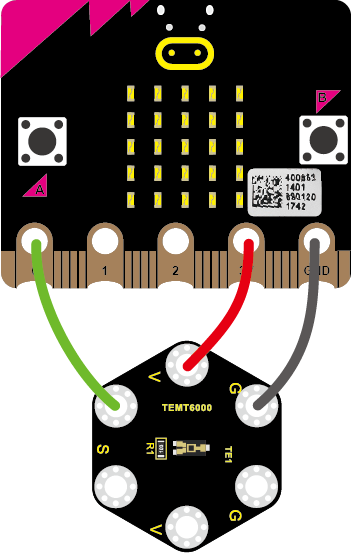
Connect the keyestudio TEMT6000 Light Module to micro:bit main board with 3 Alligator clip cables. Ring S to P0, V to 3V, G to GND.Connect the micro:bit to your computer with a micro USB cable.
So now let’s move to coding. Below are some steps to follow.
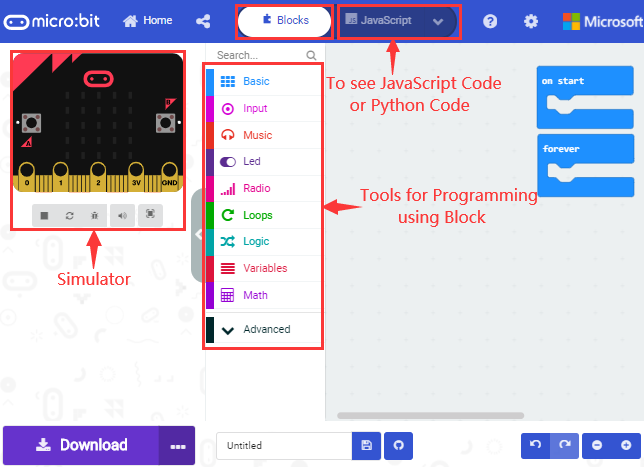
Open the https://makecode.micro:bit.org/#editor to write your code.
Microsoft MakeCode is actually a platform that allows us to code for a micro:bit, and also provides an interactive simulator where we can debug and run our code, and will be able to see what to expect out right there on the site.
Go to MakeCode and choose My Projects and click on New Projects.
If you want to see the codes behind, then you can click on JavaScript and it will display JavaScript code there in IDE.
6.The following test code is for your reference
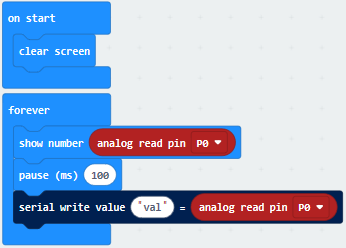
7.Test Results
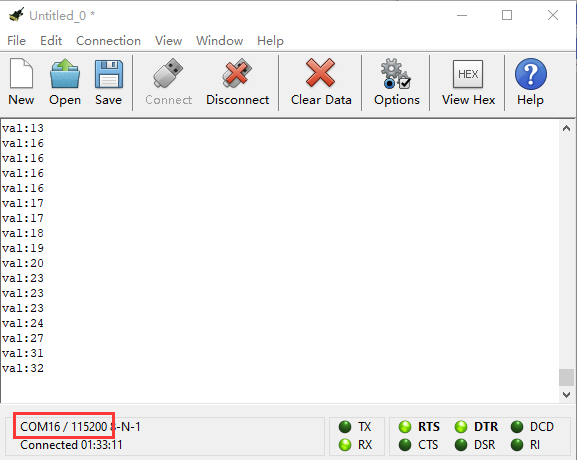
Wire up components,plug in external power and transfer code to micro:bit. Open CoolTerm, click Options and select SerialPort, set COM port and baud rate(115200). Click OK and Connect.
The CoolTerm shows the light intensity,the stronger the light intensity, the larger the analog value, as shown below: