Project 29 Self Watering System for Your Plants
1.Overview
In life, you may often water some flowers and plants from time to time to prevent them from withering, but not need to pour more. It may requires experience. So can we make a system that allows the machine to automatically water the plants’ soil when it is dry? Of course yes.
In this project, you will learn how to use a soil humidity sensor and micro:bit to detect the humidity of your plants’ soil. Display the analog value on the micro:bit LED matrix or on the serial monitor.
2.Components Required
Micro:bit Main Board*1
USB Cable*1
keyestudio Soil Humidity Sensor*1
Alligator Clip Wires*3
3.Component Introduction

The keyestudio micro bit honeycomb soil humidity sensor is fully compatible with micro bit control board. During the experiment, we connect the sensor to the micro:bit using crocodile clip wire. With this sensor, we can make an automatic watering device.
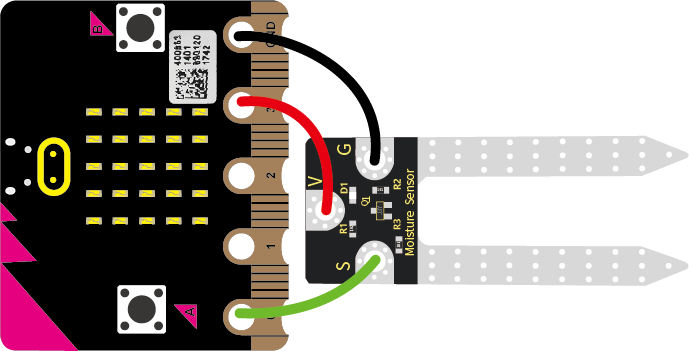
There are three connectors on this sensor,namely connector G,V and S.when using, we need to connect it the Micro:bit main board by ringing G to GND, V to 3V and S to signal port(0, 1 or 2).
When you are not at home or forget to water your plants, it can sense if your plant is thirsty.
4.Technical Parameters
Working voltage: DC 3.0-3.3V
Control port: analog port
Size: 22mm*59mm*3mm
Weight: 2.5g
Environmental attributes: ROHS
5.Connection Diagram
Connect the keyestudio micro bit honeycomb soil sensor to micro:bit main board with 3 Alligator clip cables. Ring G to GND, V to 3V and S to P0. Connect the micro:bit to your computer with a micro USB cable.
So now let’s move to coding. Below are some steps to follow.
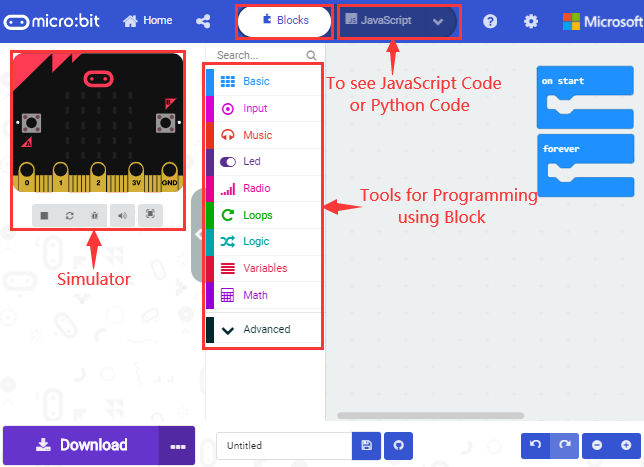
Open the https://makecode.micro:bit.org/#editor to write your code.
Microsoft MakeCode is actually a platform that allows us to code for a micro:bit, and also provides an interactive simulator where we can debug and run our code, and will be able to see what to expect out right there on the site.
Go to MakeCode and choose My Projects and click on New Projects.
If you want to see the codes behind, then you can click on JavaScript and it will display JavaScript code there in IDE.
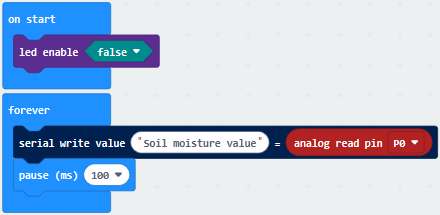
6.The following test code is for your reference
7.Test Result
Wire according to connection diagram and upload the test code to the main board.
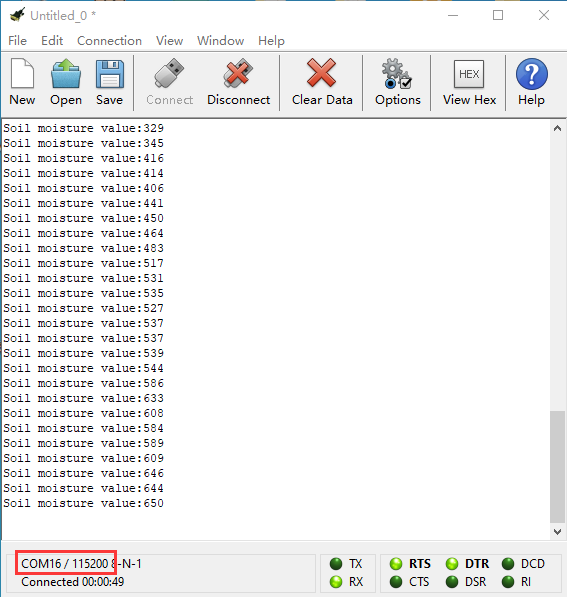
Open CoolTerm →click Options →click SerialPort to set COM port and baud rate (set it to 115200)→click OK→click Connect.
Insert the soil humidity sensor into the land and the analog value of the humidity will be shown on the CoolTerm serial port monitor. And its value will increase with the soil humidity.