Project 30: Color Sensor
1.Overview:
Color sensor enjoys wide applications in areas covering magnet, sound, pressure, temperature, displacement, acceleration, gyroscope, liquid level, torque, photoacoustic, current and strain measurement of physical quantities, almost all important fields related to economy, national defense and daily life. It especially can safely and effectively used in bad environment and has solved technical difficulties have existed in many industries for many years. Thus it has a great market demand. In this project, we will combine the Keyestudio Micro Bit Honeycomb TCS34725FN color sensor with the Micro: Bit main board to get a better understanding of how to work the color sensor.
2.Components Required
Micro:bit Main Board*1
Keyestudio Edge Connector IO Breakout Board for Micro:bit*1
USB Cable*1
Keyestudio Micro Bit Honeycomb TCS34725FN Color Sensor*1
Alligator Clip Wire*4
3.Component Introduction
About Keyestudio micro bit honeycomb TCS34725FN Color Sensor:
The core of the KeyeStudio Micro Bit Honeycomb TCS34725FN color sensor is the AMS AG’s TCS34725FN digital converter which provides digital output of the value of red, green, blue (RGB) and clear light.The integrated infrared blocking filter minimizes the infrared spectral component of the incident light and allows accurate color measurements. It features high sensitivity, wide dynamic range and infrared blocking filter. It can minimize IR and UV spectral component effects to produce accurate color measurements. And with ambient light intensity detection and maskable interrupt. It communicates through the I2C interface.
4.Communication Protocol:
As mentioned before it uses I2C communication with one data line and one clock line.There are three types of signals in the transmitting process of the I2C bus, namely the start signal, the end signal and the response signal.
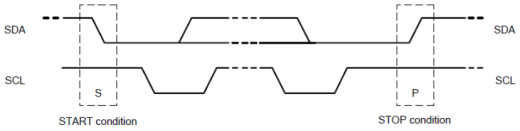
Start signal: when SCL is at high level, SDA jumps from high level to low level and starts to transmit data.
End signal: when SCL is at high level, SDA jumps from low level to high level, ending data transmission.
Response signal: the receiving IC sends a specific low level pulse to the sending IC after receiving 8bit data, indicating that the data has been received.
5.Technical Parameters
Working voltage: 3.3V/5V
Control chip: TCS34725FN
Logic voltage: 3.3V/5V
Communication port: I2C
Size: 27mm*20mm
6.Description about pins
Pins |
Description |
|---|---|
V(VCC) |
3.3V/5V ; anode |
G(GND ) |
for power supply |
SDA |
I2C data input |
SCL |
I2C clock input |
INT |
interrupt output |
LED |
abbreviation for light-emitting diodes |
7.Connection Diagram
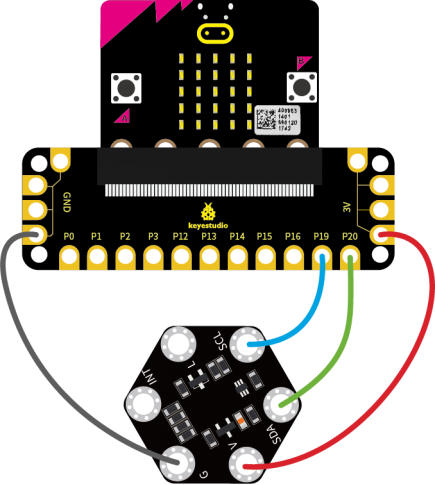
Attach the main board to Keyestudio Micro bit Sensor V2 Shield.Then connect the keyestudio micro bit honeycomb TCS34725FN color sensor to the shield with 4 Alligator clip cables. Ring G to GND, V to 3V, SDA to P20 and SCL to P19. Connect the micro:bit to your computer with a micro USB cable.
So now let’s move to coding. Below are some steps to follow.
Open the https://makecode.micro:bit.org/#editor to write your code.
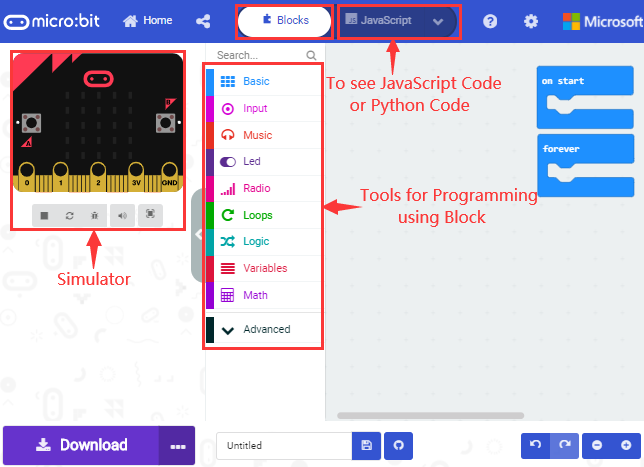
Microsoft MakeCode is actually a platform that allows us to code for a micro:bit, and also provides an interactive simulator where we can debug and run our code, and will be able to see what to expect out right there on the site.
Go to MakeCode and choose My Projects and click on New Projects.
If you want to see the codes behind, then you can click on JavaScript and it will display JavaScript code there in IDE.
Use library files to set test code and add TCS34725 Color Sensor to the below block:
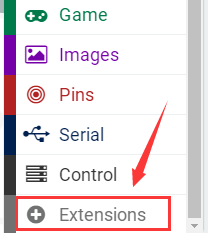
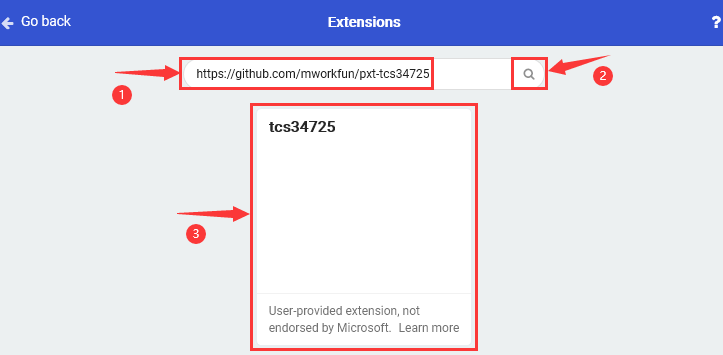
Click the link https://github.com/mworkfun/pxt-tcs34725 to download library as shown below.
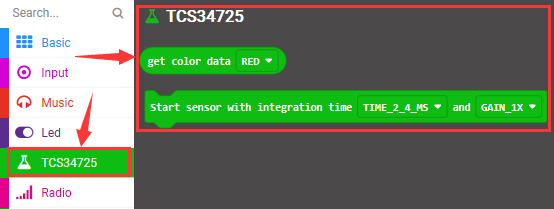
When the library of TCS34725 Color Sensor is installed successfully,the block TCS34725 can be found in the editing area as shown below:
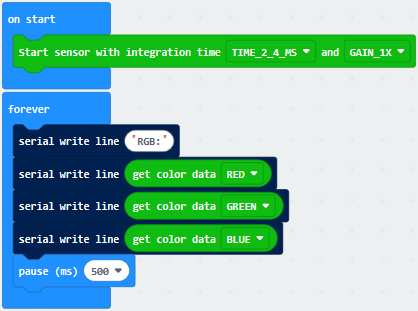
8.The following test code is for your reference
9.Test Results
Wire according to connection diagram and upload the test code to the main board.
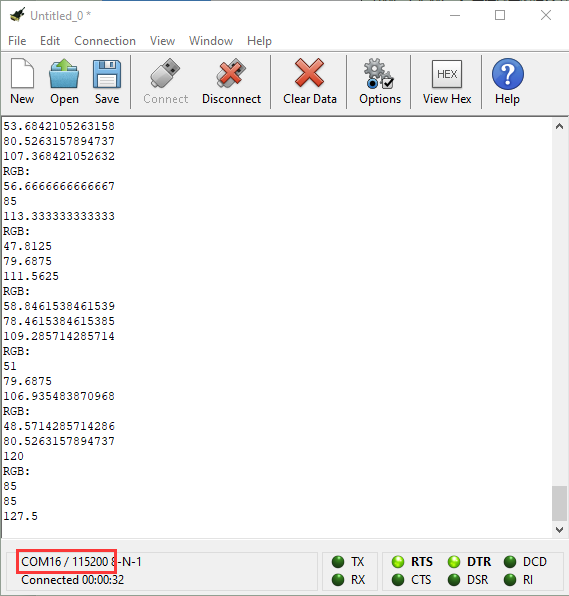
Open CoolTerm →click Options →click SerialPort to set COM port and baud rate (set it to 115200)→click OK→click Connect.
Put the keyestudio micro bit honeycomb TCS34725FN color sensor in front of stuffs in different colors, the corresponding value of RGB will be shown on the CoolTerm serial port monitor.